
Executive Summary
The year 2025 marks a definitive inflection point in the history of digital accessibility within Silicon Valley. For nearly three decades, the approach to inclusive design among the technology titans of San Jose—Adobe, Cisco, PayPal, eBay, and Zoom—was largely reactive, governed by the “compliance industrial complex.” Accessibility was frequently treated as a downstream remediation task, a series of code patches applied to satisfy the Web Content Accessibility Guidelines (WCAG) or to mitigate legal risk under the Americans with Disabilities Act (ADA). However, the convergence of three seismic forces—the enforcement of the European Accessibility Act (EAA) in mid-2025, the maturation of Agentic Artificial Intelligence (AI), and the rise of the “Product Equity” philosophy—has fundamentally altered this landscape.
This report offers an exhaustive analysis of how San Jose’s tech ecosystem is redefining inclusive design. It moves beyond the syntax of code—ARIA labels, alt-text tags, and contrast ratios—to a holistic re-engineering of the user experience. The analysis reveals that in 2025, accessibility is no longer a constraint to be managed but a generative engine for innovation. Companies are leveraging “Shift Left” engineering methodologies to catch exclusion errors in the design phase, deploying AI agents that can negotiate interfaces on behalf of users with disabilities, and integrating “Product Equity” teams into the C-suite. This report details the technical mechanisms, strategic pivots, and economic imperatives driving this revolution, offering a comprehensive roadmap of the current state and future trajectory of digital inclusion in the capital of Silicon Valley.
1. The Paradigm Shift: From Compliance to Product Equity
The narrative of accessibility in San Jose has undergone a radical semantic and operational shift. The prevailing terminology has transitioned from “Compliance” to “Inclusion” and, most recently, to “Product Equity.” This is not merely corporate branding; it represents a fundamental change in how resources are allocated, how success is measured, and how products are built.
1.1 The Failure of the “Find and Fix” Model
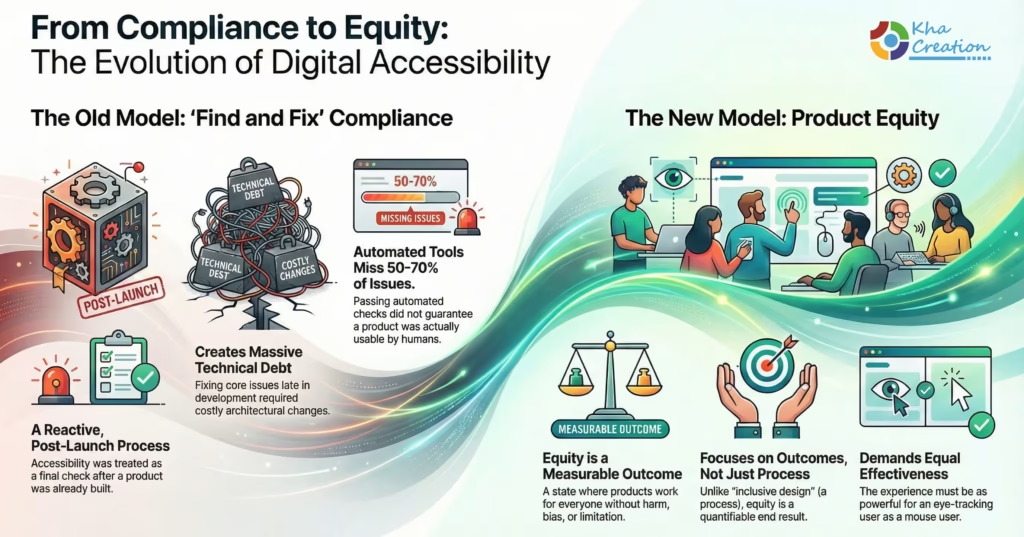
Historically, the software development lifecycle (SDLC) in Silicon Valley followed a “waterfall” or early “agile” model where accessibility was a final gatekeeper. Developers would build a product, Quality Assurance (QA) teams would run automated scanners like Axe or Lighthouse, and a list of violations would be generated. This “find and fix” model proved inherently flawed for several reasons.
- Technical Debt: By the time accessibility bugs were identified, the code was already written. Fixing a fundamental navigation error often required refactoring the entire architecture, leading to high costs and resistance from product managers.
- The Usability Gap: Automated tools can detect only about 30-50% of accessibility issues. A site could be technically compliant—passing every automated check—yet be completely unusable for a human using a screen reader due to illogical content flow or cognitive overload.
- Reactive Posture: This model treated accessibility as a legal defense mechanism rather than a user experience goal.
In 2025, this model has been largely abandoned by market leaders in favor of Product Equity. Championed notably by Adobe’s leadership, Product Equity is defined as a state where every person, regardless of human difference, can access and harness the full power of a digital product without harm, bias, or limitation.1 Unlike “inclusive design,” which is a process, “equity” is a measurable outcome. It demands that the product works as effectively for a user with cerebral palsy using eye-tracking software as it does for a neurotypical user with a mouse.
1.2 The Economic Imperative: The Purple Dollar
The driver for this shift is not purely benevolent; it is deeply rooted in market economics. The global population is aging, and the “Silver Economy” represents a massive, growing demographic with acquired disabilities (vision loss, motor impairment, cognitive decline).
- Market Power: In the U.S. alone, working-age adults with disabilities control an estimated $490 billion in disposable income.3 This “Purple Dollar” is a market segment that tech giants can no longer afford to ignore.
- Consumer Behavior: Research indicates that 83% of users with access needs limit their shopping to sites they know are accessible.4 In an era of hyper-competition, where switching costs are low, inaccessibility is a direct revenue leak.
- Brand Loyalty: 88% of organizations report that digital accessibility improves brand reputation, creating a competitive moat.5 Users who find an accessible platform tend to be fiercely loyal, as the cognitive cost of learning a new, potentially inaccessible interface is high.
1.3 The Regulatory Catalyst: EAA 2025
While the moral and economic arguments are strong, the immediate catalyst for the 2025 transformation is regulatory. The European Accessibility Act (EAA), which became fully enforceable on June 28, 2025, has acted as a forcing function for US-based global tech companies.5
- Extraterritorial Impact: Unlike the ADA, which is often enforced through civil litigation, the EAA is a set of functional requirements for products sold in the EU market. It covers e-commerce, banking services, e-books, and consumer hardware.
- Standardization: San Jose companies like PayPal, eBay, and Cisco operate globally. It is operationally inefficient to maintain two codebases—one “accessible” version for Europe and a “standard” version for the US. Consequently, the EAA has effectively exported European accessibility standards to Silicon Valley, forcing a unified, high-bar approach to compliance across all digital assets.
1.4 Deep Insight: The Metrics of Inclusion
The shift to Product Equity has required new metrics. Companies are moving away from “number of WCAG violations” to “Task Completion Rates” (TCR) for diverse user groups.
| Metric | Traditional View (Compliance) | Modern View (Product Equity) |
| Primary KPI | Number of WCAG bugs found/fixed | User Satisfaction (CSAT) of disabled users 5 |
| Success Definition | Passing an automated audit | Equivalent experience for all users |
| Responsibility | QA / Legal Team | Product Managers / Designers / Engineers |
| Business Impact | Risk Mitigation (avoiding lawsuits) | Revenue Growth / Market Expansion 5 |
This data suggests a trend where accessibility is becoming a core component of “Quality Intelligence.” Just as site speed and uptime are non-negotiable quality metrics, accessibility is now a standard measure of a product’s health.
San Jose Inclusive Innovation Blueprint
2. Adobe: Democratizing Creativity Through Generative Inclusion
Adobe, headquartered in the heart of San Jose, has positioned itself as the vanguard of the Product Equity movement. As the creator of the world’s primary creative suite (Photoshop, Premiere, Acrobat), Adobe faces a unique challenge: they must ensure their tools are accessible and that the content created with those tools is accessible. In 2025, they have leveraged Generative AI to solve the latter.
2.1 Firefly and the AI of Inclusion
The integration of Adobe Firefly (Adobe’s family of creative generative AI models) into the Creative Cloud workflow represents a massive leap for accessible content creation.
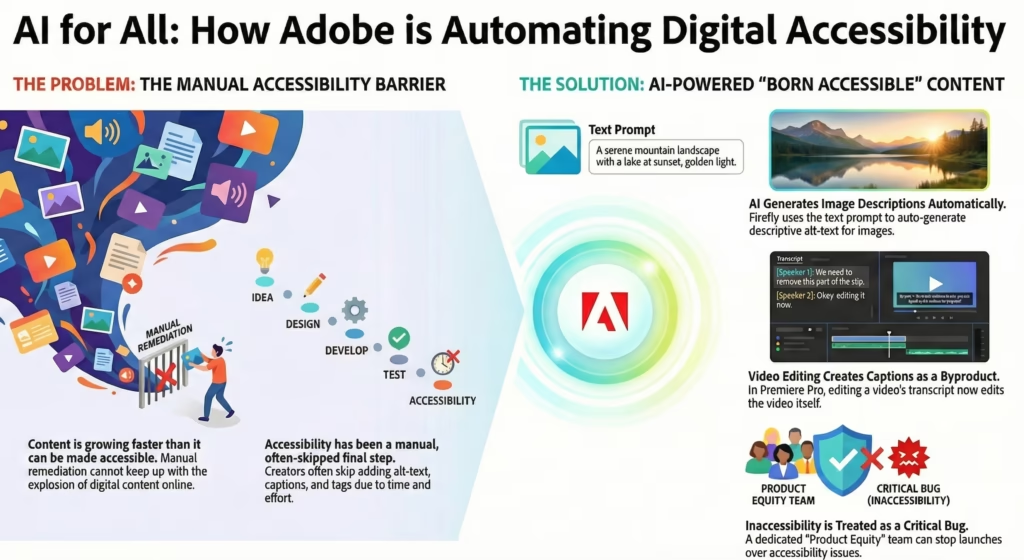
- The Metadata Challenge: Historically, the biggest barrier to the accessible web was the lack of metadata—images without alt-text, videos without captions, PDFs without tags. This required manual labor that creators often skipped.
- The AI Solution: Firefly changes this by generating structural metadata at the point of creation. When a user generates an image with Firefly using a prompt like “a futuristic city with flying cars,” the system can automatically embed that description as alt-text.7 This “born accessible” content ensures that downstream users (screen reader users) can interpret the media.
- Firefly Creative Production: Now in private beta, this system allows for batch editing of thousands of assets. It can automatically check and adjust contrast ratios and color grading to ensure legibility across massive image libraries, automating a task that would take human designers hundreds of hours.8
2.2 Premiere Pro: The Color and Caption Revolution
Video accessibility has traditionally been difficult and expensive, primarily involving manual captioning and audio description. Adobe’s 2025 updates to Premiere Pro have fundamentally altered this workflow.
- Text-Based Editing: Premiere Pro now treats the transcript as the primary navigation tool. Editors can cut video by deleting text from the auto-generated transcript. This inherently links the video to its text alternative, making accurate captioning a byproduct of the editing process rather than an afterthought.9
- Wide-Gamut Color Pipeline: The introduction of a new color management system using ACEScct provides editors with unprecedented control over dynamic range. While marketed as a creative feature, this has profound accessibility implications. It allows for precise manipulation of skin tones and contrast, enabling editors to ensure that subjects are visible and distinct against backgrounds, aiding users with low vision or color perception deficiencies.9
- Speech-to-Text maturity: By 2025, the speech-to-text engine has reached a level of accuracy that supports multiple languages and dialects, crucial for global accessibility.
2.3 The Product Equity Team: Institutionalizing Ethics
Adobe’s transition is not just technological; it is organizational. The establishment of the Product Equity team, led by directors who report to high-level executive leadership, has institutionalized accessibility.1
- The Red Lines: This team has the authority to establish “Red Lines”—standards that, if violated, stop a product launch. This mimics the “Security Red Lines” that have existed in tech for decades. If a new feature is inaccessible, it is treated as a critical bug, not a feature request.
- Inclusive Design vs. Product Equity: Adobe explicitly distinguishes between the process (Inclusive Design) and the result (Product Equity). This semantic clarity helps teams understand that good intentions (designing inclusively) are insufficient if they do not result in equitable outcomes.2
2.4 Deep Insight: AI as an Accessibility Scaler
The underlying theme of Adobe’s strategy is scale. Manual remediation cannot keep pace with the explosion of digital content. By embedding accessibility into the AI generation layer, Adobe is attempting to make the web accessible by default. If the tools used to create the web (Photoshop, Illustrator, Premiere) automatically generate accessible code and metadata, the burden on individual developers decreases, and the overall accessibility of the digital ecosystem increases exponentially.
3. eBay: The “Include” Revolution in Design Systems
eBay, a pioneer of e-commerce, has focused its 2025 accessibility efforts on the seller ecosystem and the design phase of development. Their approach highlights the importance of “Shift Left”—moving accessibility considerations upstream to the design board.
3.1 The “Include” Figma Plugin: Bridging the Hand-off Gap
One of the most persistent failure modes in software development is the “hand-off gap” between designers and developers. A designer might intend for a heading to be an H1, or for an image to be decorative, but if this isn’t explicitly communicated, the developer may implement it incorrectly.
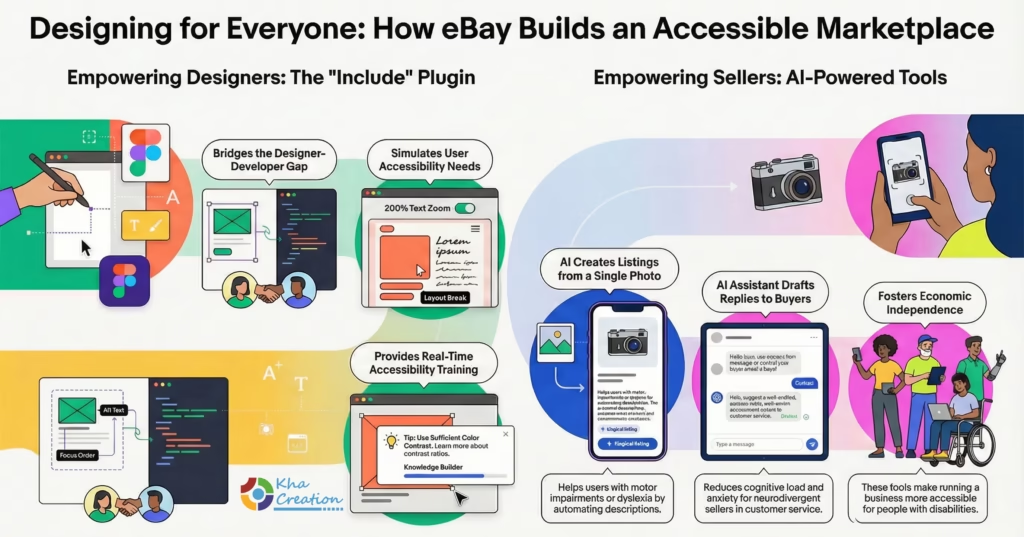
- The Tool: To solve this, eBay built and open-sourced Include, a plugin for Figma (the industry-standard design tool).10
- Functionality: The plugin allows designers to annotate their files with accessibility specifications. It prompts them to define the reading order, heading hierarchy, and image descriptions.
- Simulation Features: A critical feature of Include is its ability to simulate different user states. It can automatically generate a view of the design with text zoomed to 200%. This forces the designer to confront the reality of how their layout behaves when a user with low vision scales the text, revealing breaks and overlaps that would otherwise only be caught in QA.10
- Educational Impact: The plugin also serves as an educational tool, explaining why a certain annotation is needed, effectively training the design team on WCAG principles in real-time.
3.2 AI-Powered Seller Tools: Cognitive Accessibility
eBay’s marketplace relies on millions of individual sellers, many of whom are small business owners or individuals clearing out their homes. This demographic is incredibly diverse and includes many people with disabilities.
- Magical Listing: eBay’s “magical listing” tool uses computer vision and generative AI to extrapolate item details from a single photo.12 For a seller with motor impairments (who finds typing painful) or dyslexia (who finds writing descriptions difficult), this tool removes a massive barrier to entry. It automates the categorization, titling, and description of the item.
- AI Messaging Assistant: The AI assistant helps sellers draft replies to buyer inquiries.13 This feature is particularly beneficial for neurodivergent sellers who may struggle with the social nuances of customer service or experience anxiety around communication. By providing professional, context-aware suggestions, the AI reduces the “emotional labor” and cognitive load of selling.
3.3 Economic Inclusion
eBay’s initiatives align with the broader goal of economic independence for people with disabilities. By simplifying the inventory management process with features like the “your cost” field 13, eBay makes the business side of selling more accessible. This supports the mission of organizations like the Silicon Valley Independent Living Center (SVILC), which advocates for the independence of people with disabilities.15 Enabling someone to run a business from home, with tools that accommodate their specific needs, is a powerful form of economic inclusion.
San Jose Inclusive Innovation Blueprint
4. PayPal: Financial Inclusion via Agentic AI
PayPal’s 2025 strategy focuses on “Agentic Development,” a move that transforms how developers and merchants interact with financial technology. This shift is crucial because financial independence is a cornerstone of autonomous living.
4.1 The Model Context Protocol (MCP) and Agentic UI
In May 2025, PayPal highlighted its adoption of the Model Context Protocol (MCP) to drive “Agentic Development”.17
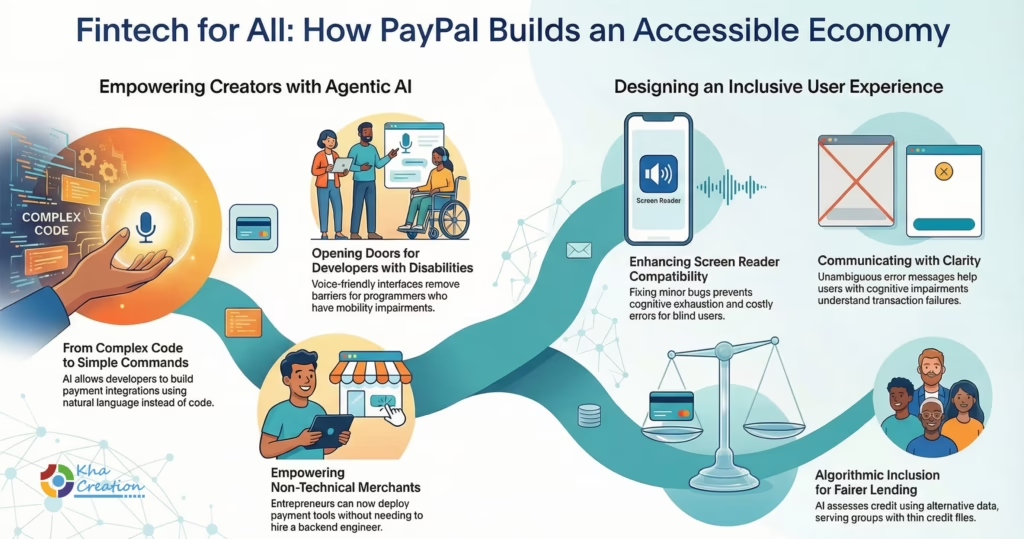
- From Syntax to Semantics: Traditional payment integration requires deep knowledge of APIs and coding syntax. The Agentic approach allows developers to use natural language to instruct AI agents to build integrations. “Build a checkout flow for a subscription service” becomes a prompt rather than a week of coding.
- Accessibility for Developers: This paradigm shift is a boon for developers with disabilities. Programmers with mobility impairments (e.g., RSI, paralysis) who rely on voice coding often struggle with the precise syntax of code. Natural language interfaces are inherently more forgiving and accessible via voice, opening the door for more developers with disabilities to participate in the fintech ecosystem.17
- Merchant Empowerment: This technology allows non-technical merchants—perhaps a neurodivergent artist or a disabled entrepreneur—to deploy sophisticated payment bots and tools without needing to hire a backend engineer.18
4.2 Screen Reader Optimization and Mobile Equity
PayPal has been rigorously updating its consumer-facing apps to ensure compatibility with the latest assistive technologies, such as NVDA 2025.3.2 and Apple’s VoiceOver.19
- Granular Fixes: Release notes from late 2024 and 2025 show a focus on nuanced interaction details. For example, fixes were deployed to prevent VoiceOver from reading the word “checked” three times on waiver agreements, and to stop the screen reader from re-reading the entire page when a user clicks “Next”.20
- Why This Matters: These may seem like minor bugs, but for a blind user, they create significant friction. Repeatedly hearing “checked checked checked” is cognitively exhausting. A page refresh that loses focus can cause a user to accidentally double-pay. By fixing these, PayPal demonstrates a commitment to the quality of the accessible experience, not just functional compliance.
- Visual Validation: Updates to the “Pay Later” flow improved how declined transactions are communicated visually and programmatically.21 Clear, unambiguous error messages are critical for users with cognitive impairments or anxiety, ensuring they understand exactly why a transaction failed without confusion.
4.3 Algorithmic Inclusion: Lending for All
Accessibility extends to the underlying logic of finance. PayPal is leveraging AI to assess creditworthiness using alternative data sources, moving beyond traditional credit scores that often disadvantage marginalized groups, including those with disabilities who may have thin credit files due to lower workforce participation.22 This “algorithmic inclusion” aims to provide capital to SMBs that are traditionally underserved, aligning with the company’s broader mission of democratizing financial services.
5. Zoom & Cisco: The Battle for Hybrid Equity
As the world settles into a permanent hybrid work model in 2025, the virtual meeting room has become the primary workspace. San Jose’s communication giants, Zoom and Cisco (Webex), are competing to create the most inclusive virtual environment, a concept known as “Meeting Equity.”
5.1 Zoom’s AI Companion 2.0: Personalizing Accessibility
Zoom’s strategy revolves around individual customization via its AI Companion. The philosophy is that accessibility needs are highly personal; what works for one user (e.g., high contrast captions) might be distracting for another.
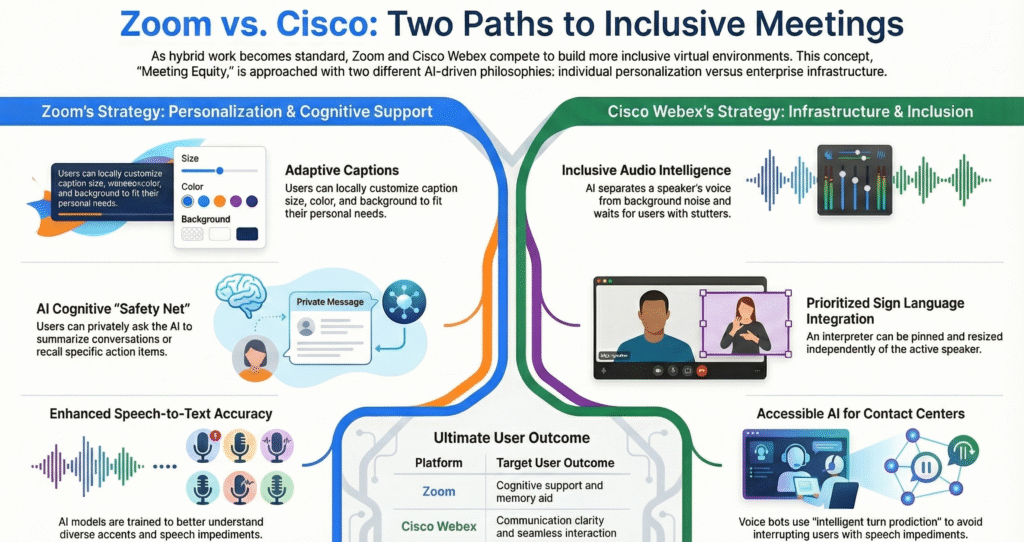
- Adaptive Captions: Zoom’s AI now enables users to customize caption settings (size, color, background) locally. This means a user with low vision can have massive yellow-on-black text, while a user with ADHD can have subtle subtitles, all within the same meeting.23
- Cognitive Safety Nets: The “Ask AI Companion” feature allows users to query the meeting in real-time.24 A user can ask, “What was the last action item assigned to me?” or “Summarize the last 5 minutes.” For users with attention deficits, auditory processing disorders, or memory impairments, this acts as a cognitive prosthetic, ensuring they remain synchronized with the team without the embarrassment of asking for repetition.
- Speech Accuracy: Zoom has invested heavily in speech recognition models that handle diverse accents and speech impediments better than previous generations, ensuring that the “foundation” of accessibility—the transcript—is accurate.23
5.2 Cisco Webex: The Infrastructure of Inclusion
Cisco Webex approaches accessibility from an enterprise infrastructure perspective, focusing on the contact center and audio fidelity.
- AI Agent for Contact Center: Launched fully in 2025, this tool allows for autonomous resolution but includes specific accessibility features like “intelligent turn prediction”.26
- Mechanism: For a user with a speech impediment (e.g., stuttering), standard voice bots often interrupt or time out. Webex’s AI is trained to recognize dysfluency patterns and wait, allowing the user to finish their thought. This “advanced barge-in” handling makes the voice interface viable for millions of users previously excluded from voice-activated services.
- Audio Intelligence: Webex’s “optimize for my voice” feature separates the speaker’s voice from background noise. For listeners with hearing aids or auditory processing issues, this clarity is essential for comprehension.28
- Sign Language Integration: Webex allows for custom stage layouts where a sign language interpreter can be pinned and sized independently of the active speaker, ensuring that deaf participants always have visual access to their interpreter.29
5.3 Comparative Analysis: Meeting Equity
| Feature | Zoom Strategy (Personalization) | Cisco Webex Strategy (Infrastructure) |
| Transcription | “Ask AI” for retrospective queries and catch-up 24 | Real-time transcription with active “mid-call” summaries 26 |
| Audio Processing | Speech recognition optimized for transcription accuracy 25 | “Barge-in” and dysfluency handling for natural conversation 27 |
| Visual Customization | Localized caption styling (font/color) 23 | Stage Manager for interpreter prioritization 29 |
| Target User Outcome | Cognitive support and memory aid | Communication clarity and seamless interaction |
6. The “Shift Left” Engineering Culture
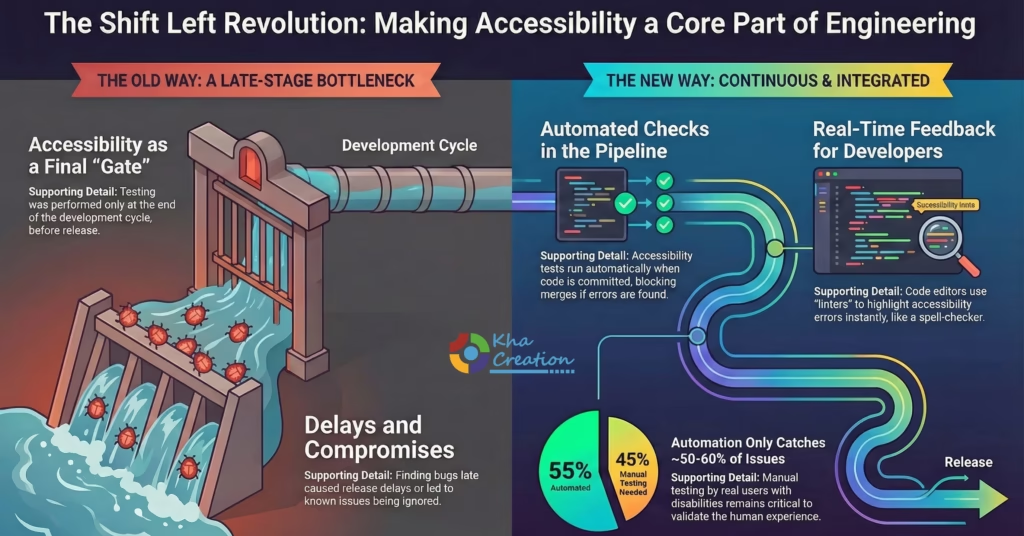
Perhaps the most invisible yet impactful change in 2025 is the widespread adoption of “Shift Left“ engineering practices regarding accessibility. This philosophy dictates that accessibility testing must move from the end of the development cycle (QA) to the beginning (Design and Code).
6.1 The Mechanics of Shifting Left
In the traditional model, accessibility was a “gate” before release. If bugs were found, they delayed the release—or worse, were waived to meet a deadline. In the “Shift Left” model, accessibility is continuous.
- CI/CD Integration: Companies like LinkedIn and Microsoft have integrated tools like axe-core (developed by Deque Systems) directly into their Continuous Integration/Continuous Deployment (CI/CD) pipelines.30
- The Pipeline: When a developer commits code to GitHub or GitLab, an automated accessibility test runs immediately. If the code is missing a label on a button or has a contrast violation, the build fails. The developer cannot merge the code until it is fixed. This enforces a “clean code” policy for accessibility similar to security.
- Linting: Developers use IDE extensions (Linters) that highlight accessibility errors as they type, much like a spell-checker. This provides immediate feedback, training developers to write accessible code by rote.30
- Playwright & Automation: The use of Playwright for end-to-end testing has become standard. Engineers write tests that simulate a screen reader user navigating the site, verifying not just the code, but the behavior of the application.32
6.2 LinkedIn: Real-Time Architecture as Accessibility
LinkedIn’s engineering transformation in 2025, led by engineers like Nishant Lakshmikanth, involved a massive migration to a real-time architecture.33
- Performance is Accessibility: While primarily an infrastructure project, this shift has major accessibility benefits. Users on older devices, slow networks, or utilizing resource-heavy assistive technologies (like screen magnifiers) suffer disproportionately from slow load times. By optimizing the “Time to Interactive,” LinkedIn improves the experience for these marginalized users.
- Content Moderation: LinkedIn has also implemented algorithms to detect and downrank “inaccessible” user-generated content, such as posts using “fancy fonts” (mathematical Unicode characters) that are unreadable by screen readers.34 This proactive policing of the feed ensures that the platform remains usable for blind professionals.
6.3 The Limits of Automation: The Human in the Loop
Despite the advancements in automated testing, the consensus in 2025 is that automation is insufficient.
- The 50% Rule: Automated tools can catch approximately 50-60% of WCAG violations.35 They can tell you if an image has alt-text, but they cannot tell you if the alt-text is accurate or helpful.
- Manual Testing: Consequently, manual testing with native screen readers (VoiceOver, NVDA, JAWS) remains a critical component of the “Definition of Done”.36 Community partners like the Center for Accessible Technology (C4AT) provide “test banks” of users with disabilities to perform this validation, ensuring that the human experience is validated alongside the code.38
San Jose Inclusive Innovation Blueprint
7. AI Agents: The New Interface of 2026
As we look toward the latter half of 2025 and into 2026, the very nature of the user interface (UI) is dissolving. Google and other San Jose giants are pioneering Agentic UI (A2UI), where the interface is generated dynamically by AI based on the user’s intent.
7.1 Generative UI (GenUI)
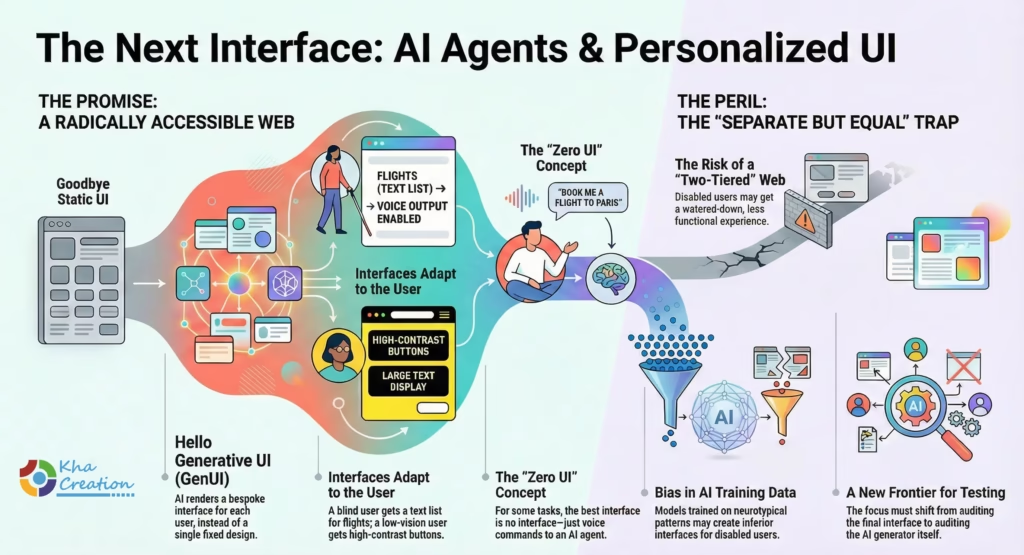
In the traditional web paradigm, developers build a “one size fits all” interface that attempts to accommodate everyone. In the A2UI paradigm, the AI agent understands the user’s specific accessibility profile and renders a bespoke interface.39
- Google’s Opal Project: This initiative demonstrates how AI can drive the user experience without a fixed frontend.
- Scenario: A blind user asks an agent to “book a flight.” Instead of rendering a complex visual grid of flights (which is hard to navigate with a screen reader), the agent might generate a simplified, text-based list or simply converse with the user to narrow down the options.
- Scenario: A user with low vision might receive an interface with massive buttons and high-contrast text, generated on the fly.
- The “Zero UI” Concept: For many tasks, the most accessible interface is no interface. Agents that can perform complex workflows (e.g., “File my taxes,” “Order my groceries”) via voice command remove the navigational complexity of visual apps entirely.
7.2 The Risk of Bias and the “Separate but Equal” Trap
While promising, GenUI introduces significant ethical risks.
- Bias: If the AI model is trained on data that prioritizes neurotypical interaction patterns, it might generate “simplified” interfaces for disabled users that lack full functionality.
- Equivalence: The challenge for teams like Adobe’s Product Equity group is to ensure that these dynamically generated interfaces provide equivalent power and agency.2 There is a danger of creating a “two-tiered” web where disabled users get a watered-down experience. This is the next frontier of accessibility testing: auditing the generator rather than the interface.
8 . Regulatory Landscapes & Global Ripple Effects
While San Jose innovates, the regulatory clock is ticking. The European Accessibility Act (EAA), effective June 28, 2025, has been the single biggest external motivator for US tech companies.5
8.1 The EAA Effect: Brussels Regulates Silicon Valley
The EAA requires that products placed on the EU market be accessible. This includes e-books, e-commerce, banking services, and operating systems.
- Global Standardization: Rather than maintaining separate codebases for the US and EU, companies like PayPal and eBay are updating their global platforms to meet EAA standards. This means a user in San Jose benefits from a law passed in Brussels. The cost of maintaining two versions is higher than the cost of making the global version accessible.
- Liability: The perceived legal risk is high. 2024 and 2025 saw a continuation of ADA title III lawsuits in the US, but the EAA introduces fines and market removal penalties, raising the stakes for non-compliance significantly.5
8.2 WCAG 3.0: The Future Standard
The industry is also preparing for WCAG 3.0 (Project Silver). This new standard moves away from a simple pass/fail binary to a “score” based on user outcomes. San Jose companies are already aligning their “Product Equity” metrics with this outcome-based approach, focusing on functional usability rather than technical compliance.48
9 . Future Outlook: 2026-2030
As we look toward 2026, three major trends will define the next phase of inclusive design in Silicon Valley:
- Neuro-Inclusive Design: The focus will expand from sensory disabilities (vision/hearing) to cognitive diversity. Interfaces will offer “calm modes,” summary tools, and executive function aids as standard settings, driven by AI.49
- The End of “Accessibility Modes”: Accessibility features will become so integrated that the distinction between “assistive technology” and “standard technology” will blur. Voice control, eye-tracking, and text-to-speech will be primary interaction models for everyone, popularized by the broader consumer adoption of AI agents.
- Algorithmic Justice: The battleground will shift to the “black box” of AI. Ensuring that lending algorithms (PayPal), hiring algorithms (LinkedIn), and creative algorithms (Adobe) do not discriminate against people with disabilities will be the primary ethical challenge.
FAQ
Q1: What is “Shift Left” in the context of accessibility?
A: “Shift Left” refers to moving accessibility testing to the earliest stages of the software development lifecycle (design and coding), rather than waiting for Quality Assurance (QA) at the end. It involves using tools like design linters and automated unit tests to catch errors before they are compiled. This approach reduces the cost of fixing bugs and ensures that accessibility is baked into the product’s architecture.31
Q2: How is AI helping with web accessibility in 2025?
A: AI is transforming accessibility in three key ways:
- Remediation: Automatically generating alt-text, captions, and structural tags (Adobe Firefly, Zoom).
- Creation: Helping users with disabilities write content, generate code, or create art (PayPal Agentic tools, eBay Magical Listing).
- Interaction: Enabling voice and natural language interfaces that replace complex navigation (Cisco AI Agent, Google Agentic UI).8
Q3: Why are San Jose companies so focused on the European Accessibility Act (EAA)?
A: The EAA, effective June 2025, applies to any company selling digital products or services in the EU. Global tech giants must comply with these strict standards to operate in the European market. Operationally, it is more efficient to upgrade their global platforms to meet these standards than to maintain separate versions, meaning US users benefit from EU regulations.5
Q4: What is the difference between “Inclusive Design” and “Product Equity”?
A: “Inclusive Design” is a methodology—a process of creating products that considers diversity (e.g., involving disabled users in testing). “Product Equity” is an outcome—a measurable state where the product actually works for everyone without harm or bias. Adobe champions this term to emphasize accountability and results over just good intentions.1
Q5: What tools are designers using to ensure accessibility before coding?
A: Designers are using plugins like eBay’s Include for Figma. This tool allows them to annotate accessibility requirements (like heading levels, reading order, and alt-text) directly in the visual design files. It also simulates low-vision experiences (e.g., 200% zoom) to test layout robustness before hand-off to developers.10
Q6: How does the “Purple Dollar” influence tech companies?
A: The “Purple Dollar” refers to the spending power of people with disabilities, estimated at nearly $490 billion in the US alone. Tech companies recognize that ignoring this demographic is a massive lost revenue opportunity. Furthermore, accessible sites tend to have better overall User Experience (UX) and higher customer retention rates across all demographics.3
Conclusion
The transformation of inclusive design in San Jose represents a maturation of the technology industry. The era of “move fast and break things” is being replaced by a more nuanced philosophy: “move thoughtfully and include everyone.”
By leveraging AI not just as a feature but as an infrastructure for equity, companies like Adobe, PayPal, eBay, and Zoom are proving that accessibility is a driver of innovation, not a tax on development. The “Beyond Code” movement acknowledges that true inclusion cannot be achieved by syntax alone; it requires a redesign of the workflow, the culture, and the very intent of the creator. As regulatory frameworks like the EAA tighten and the “Silver Economy” expands, the strategies piloted in Silicon Valley in 2025—Agentic UI, Product Equity, and Shift Left engineering—will likely become the global standard for the digital interactions of tomorrow. The future of the web is not just about being online; it is about being open to all.
San Jose Inclusive Innovation Blueprint
References/ Works cited
- Building with everyone is just building better: The evolution of product equity at Adobe, accessed on January 7, 2026
- How Adobe’s Product Equity team is setting new standards for our experiences, accessed on January 7, 2026
- 16 Accessibility Questions to Ask Your Digital Agency, accessed on January 7, 2026
- Recent Web Accessibility Statistics and Trends | Recite Me, accessed on January 7, 2026
- State of Digital Accessibility Report | 2025-2026 – Level Access, accessed on January 7, 2026
- Accessibility Strategy Archives – TPGi — a Vispero company, accessed on January 7, 2026
- Accessibility At Adobe, accessed on January 7, 2026
- Adobe Firefly Delivers Groundbreaking AI Audio, Video and Imaging Innovations and New Models in All-In-One Creative AI Studio, accessed on January 7, 2026
- Introducing new AI-powered features and workflow enhancements in Premiere Pro and After Effects 25.2 | Adobe Blog, accessed on January 7, 2026
- How eBay Made Its New Accessibility Tool — And Made It Available to All, accessed on January 7, 2026
- Figma plugin – Anna Zaremba, accessed on January 7, 2026
- eBay Reduces the Time to List on Mobile With New Simplified Selling Tool, Now Featuring Magical Listing AI Technology, accessed on January 7, 2026
- eBay reveals new technology for sellers at OPEN25 – Digital Commerce 360, accessed on January 7, 2026
- AI Assistant | Seller Center – eBay, accessed on January 7, 2026
- Programs – Silicon Valley Independent Living Center, accessed on January 7, 2026
- Silicon Valley Independent Living Center – a disability justice organization, accessed on January 7, 2026
- How PayPal’s Latest AI Innovations Are Transforming Payment Integrations, accessed on January 7, 2026
- Democratizing Commerce with PayPal AI Toolkit, accessed on January 7, 2026
- Download NVDA – NV Access, accessed on January 7, 2026
- Release notes 2024 – GoFundMe Pro, accessed on January 7, 2026
- Payment Services Release Notes | Adobe Commerce – Experience League, accessed on January 7, 2026
- Empowering Small Business Success: PayPal Launches Policy Call to Action, accessed on January 7, 2026
- Here’s how AI is helping make Zoom meetings more inclusive and accessible, accessed on January 7, 2026
- 6 AI Companion features you should know about and try right now – Zoom, accessed on January 7, 2026
- Putting AI quality first to enhance accessibility and collaboration – Zoom, accessed on January 7, 2026
- Cisco Unveils Advanced AI-Powered Webex Contact Center Solutions and Industry Integrations, accessed on January 7, 2026
- Discover What’s New from WebexOne 2025 | Connected Intelligence, accessed on January 7, 2026
- AI is Shaping Inclusive and Accessible Collaboration – Webex Blog, accessed on January 7, 2026
- Webex Accessibility Features | Collaboration For Everyone, accessed on January 7, 2026
- Three quick ways to shift left and fix accessibility issues sooner – Deque Systems, accessed on January 7, 2026
- Shifting left to get accessibility right at Microsoft, accessed on January 7, 2026
- Web for All: Enhancing Quality Intelligence with Automated Accessibility Testing using Playwright and axe-core with Rodrigo Silva Ferreria – TESTHEAD, accessed on January 7, 2026
- LinkedIn’s Migration Journey to Serve Billions of Users by Nishant Lakshmikanth at QCon SF – InfoQ, accessed on January 7, 2026
- 5 accessibility defects LinkedIn could resolve to make content more accessible, accessed on January 7, 2026
- The Role of Automation in Accessibility Testing – TestDevLab, accessed on January 7, 2026
- How to Make Your Fintech ADA Compliant: A Step-by-Step Guide for 2025 – Netguru, accessed on January 7, 2026
- Topics – nvda@nvda.groups.io, accessed on January 7, 2026
- User-Testing Services – Center for Accessible Technology, accessed on January 7, 2026
- Introducing A2UI: An open project for agent-driven interfaces – Google for Developers Blog, accessed on January 7, 2026
- 2025 IoT Market Insights Report: IoT Trends & Solutions | Verizon, accessed on January 7, 2026
- Digital Twin Consortium Welcomes Outsight as Member, accessed on January 7, 2026
- IoT Tech Expo North America 2025: Shaping the future of IoT innovation in Santa Clara | IoT Now News & Reports, accessed on January 7, 2026
- IoT Tech Expo North America 2025 is coming back to Santa Clara Convention Center on June 4-5, 2025. | IoT For All, accessed on January 7, 2026
- Disability-Forward Design Across Multiple Cities – National League of Cities, accessed on January 7, 2026
- Assistive Technology – Silicon Valley Independent Living Center, accessed on January 7, 2026
- Dan Brightmore, Author at Interface, accessed on January 7, 2026
- Is AI really eating your job? – UCSC Silicon Valley Extension, accessed on January 7, 2026
- Discover the latest trends in digital accessibility for 2025 – inSuit, accessed on January 7, 2026
- Designing for Diversity: Inclusive UX Trends and Best Practices in 2025 – Medium, accessed on January 7, 2026
- What is Shift-Left Testing? – Datadog, accessed on January 7, 2026
- Shift Left Testing: Approach, Strategy & Benefits | BrowserStack, accessed on January 7, 2026