
Accessibility Integration in the 2025 Digital Landscape
Summary
The digital ecosystem of 2025 is characterized by a definitive convergence of regulatory stringency, economic necessity, and technological evolution. Accessibility, once relegated to the periphery of compliance checklists or treated as a post-production “nice-to-have,” has migrated to the absolute center of software engineering, product strategy, and legal risk management. The paradigm of “Shift Left”—the methodological practice of moving testing, validation, and remediation processes from the final stages of the Software Development Life Cycle (SDLC) to the earliest phases of design and requirement gathering—has emerged not merely as a best practice but as a survival mechanism for modern enterprises.
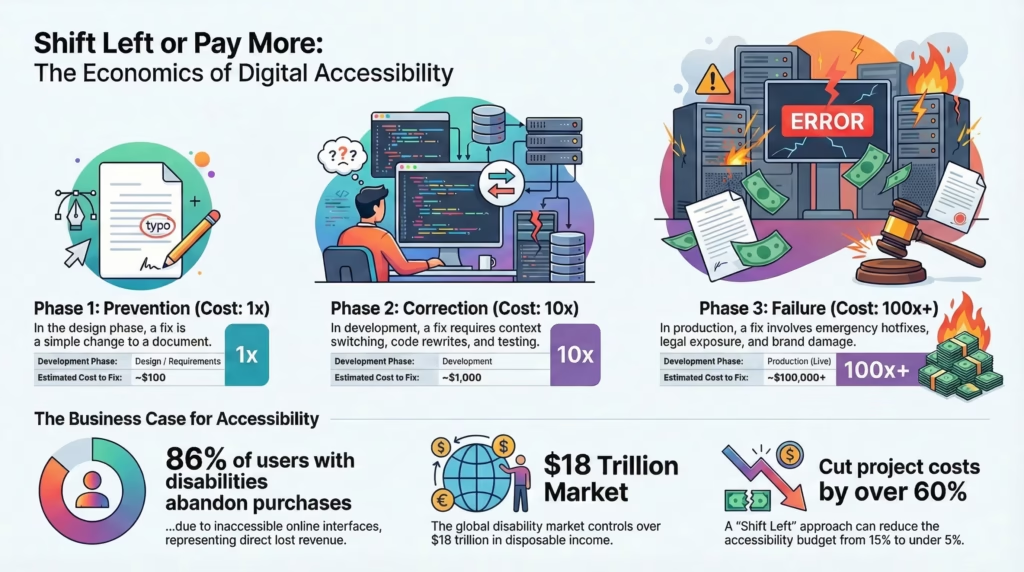
The financial logic underpinning this shift is irrefutable. Supported by decades of data from the IBM Systems Sciences Institute and contemporary analysis of DevOps workflows, the cost of addressing software defects follows an aggressive exponential curve as a product matures through its lifecycle. The “1-10-100 Rule” serves as the governing economic principle: a defect that costs $1 to prevent in the design phase will cost $10 to correct during development and $100 to remediate once released to production.1 In the context of digital accessibility—where remediation often necessitates fundamental restructuring of semantic architecture and design systems—this multiplier frequently exceeds the standard projections, creating a massive burden of technical debt that stifles innovation and drains operational budgets.
Simultaneously, the global regulatory environment has reached a tipping point. The enforcement of the European Accessibility Act (EAA) in June 2025, the stringent mandates from the Securities and Exchange Board of India (SEBI) for financial entities, and the Department of Justice’s Final Rule under Title II of the ADA in the United States have created a synchronized global compliance cliff. Organizations failing to integrate inclusive design principles face a trifecta of consequences: punitive legal sanctions, market exclusion, and reputational erosion. Conversely, the rise of Generative Engine Optimization (GEO) has linked accessibility standards directly to visibility in AI-driven search results, effectively making inclusive code a prerequisite for digital discoverability in the age of Large Language Models (LLMs).
This report offers an exhaustive analysis of the Shift Left methodology. It quantifies the financial ROI, dissects the 2025 regulatory landscape, provides a technical roadmap for integration, and explores the symbiotic relationship between accessibility and the emerging field of GEO.
1. The Economic Paradigm: Deconstructing the Cost of Quality
The foundational argument for shifting accessibility left is rooted in the economics of software quality. As organizations strive for velocity in their CI/CD (Continuous Integration/Continuous Deployment) pipelines, the friction caused by late-stage defect discovery becomes the primary bottleneck to efficiency.
1.1 The Theoretical Framework: The 1-10-100 Rule
The “1-10-100 Rule,” originally developed by George Labovitz and Yu Sang Chang, provides a robust framework for understanding the escalating costs of quality failures. While initially applied to general quality management, its application to software engineering by the IBM Systems Sciences Institute has become the standard model for justifying preventive investment.1
Phase 1: Prevention ($1)
In the context of digital accessibility, the “Prevention” phase corresponds to the requirements gathering and design stages. Here, the “cost” is represented as a single unit ($1). This investment takes the form of:
- Inclusive User Stories: Defining acceptance criteria that explicitly state accessibility requirements (e.g., “The modal must trap focus until closed”).
- Design Annotations: Designers specifying heading levels (H1-H6), reading order, and accessible names for interactive elements within tools like Figma.
- Contrast Validation: Selecting brand colors that meet WCAG AA or AAA ratios before they are codified into a design system.
At this stage, a “defect” is simply a concept on a screen or a line of text in a requirement document. “Fixing” it requires no code compilation, no regression testing, and no deployment. It is a matter of communication and decision-making.
Phase 2: Correction ($10)
Once the project moves into the coding and unit testing phase, the cost of rectifying an error increases by an order of magnitude ($10). This escalation occurs because the defect has now been materialized into logic and syntax.
- Context Switching: A developer must stop their current task to address the bug. Research shows that resuming a task after an interruption can take upwards of 23 minutes, representing a significant loss in productivity.
- Re-Work: The code must be rewritten, re-compiled, and re-tested locally.
- Dependencies: Changing a component’s structure (e.g., converting a clickable <div> to a <button>) might break the styling or behavior of other components that inherit from it.
Phase 3: Failure ($100)
The “Failure” phase represents the cost of a defect that escapes to production. The 100x multiplier is often a conservative estimate in the realm of accessibility.
- Incident Management: The defect must be reported by a user or auditor, triaged by a product manager, reproduced by QA, and assigned to a developer.
- The Hotfix Cycle: The remediation often requires an emergency patch, bypassing standard workflows and creating instability.
- External Costs: This includes customer support costs (users calling because they cannot complete a transaction), lost revenue (abandoned carts), legal fees, and potential settlements.
1.2 Quantitative Analysis of Accessibility Remediation
When we analyze the specific costs associated with accessibility defects, the data supports the aggressive implementation of Shift Left strategies. Analysis by Deque Systems and other industry leaders provides a granular view of these costs.
| Development Phase | Defect Type | Estimated Cost to Fix | Operational Impact | Multiplier |
| Design / Requirements | Missing Label (Concept) | ~$100 | Update wireframe or Jira ticket. Zero code impact. | 1x |
| Development | Missing Label (Code) | ~$1,000 | Developer context switch, rewrite, local test. | 10x |
| QA / Testing | Missing Label (Found in Test) | ~$10,000 | Bug logging, triage meetings, regression testing, release delay. | 100x |
| Production | Missing Label (Live) | ~$100,000+ | Support tickets, hotfix deployment, legal exposure, PR damage. | 1,000x |
Data synthesized from IBM Systems Sciences Institute and Deque Systems Analysis.3
Research indicates that fixing a software flaw in the planning phase is 6.5 times cheaper than in implementation, 15 times cheaper than in testing, and 100 times cheaper than in maintenance.2 For a large-scale enterprise application, a proactive “Shift Left” approach can reduce the accessibility budget from roughly 15% of the total project cost to under 5%—a savings of tens of thousands of dollars per project.4
1.3 The Compounding Nature of Technical Debt
Accessibility defects that are not addressed immediately accumulate as “technical debt.” Unlike functional bugs which might crash an application and demand immediate attention, accessibility bugs often remain silent until they trigger a compliance audit or a lawsuit.
Retrofitting accessibility is notoriously difficult. For instance, creating a custom dropdown menu using <div> elements instead of the native <select> element requires the developer to manually recreate all the semantic information and keyboard behaviors that the browser provides for free.
- Keyboard Support: Listeners for Enter, Space, ArrowUp, ArrowDown, Escape, and Tab must be scripted manually.
- Screen Reader Announcements: ARIA states like aria-expanded, aria-selected, and aria-activedescendant must be managed dynamically.
- Focus Management: The focus must be programmatically moved and trapped within the menu.
If this “div soup” is deployed to production, remediating it involves ripping out the complex, custom code and replacing it with standard HTML or a robust accessible library. This refactoring carries a high risk of introducing regression bugs, further inflating the cost. Data suggests that amending accessibility bugs in the testing phase costs 30 times as much as baking them into the initial development stage.6
1.4 The “Click-Away Pound” and Opportunity Cost
The economic argument extends beyond cost savings to revenue protection. The “Click-Away Pound” refers to the lost revenue when customers with disabilities abandon a website due to accessibility barriers.
- Abandonment Rates: 86% of users with disabilities report abandoning online purchases because of inaccessible interfaces.7
- Market Size: The global disability market controls over $18 trillion in disposable income.8
- Brand Loyalty: Accessible brands see a 23% higher customer retention rate. Conversely, the “network effect” means that users with disabilities—who often have strong community networks—will actively dissuade peers from using inaccessible services.7
2. The 2025 Regulatory Tsunami: A Global Compliance Cliff
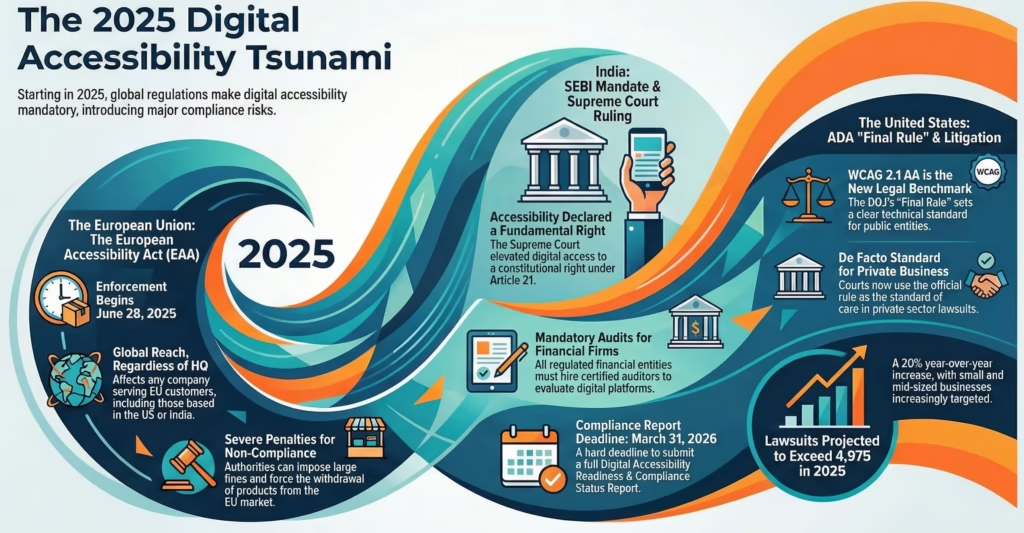
While economic efficiency drives the engineering argument, the legal landscape of 2025 provides the mandatory impetus for executive boards. A synchronization of global regulations has effectively ended the era of voluntary accessibility.
2.1 The European Accessibility Act (EAA): The GDPR of Accessibility
Enforcement Date: June 28, 2025.9
The European Accessibility Act (Directive 2019/882) is the most significant piece of digital accessibility legislation since the ADA. Its impact is comparable to the GDPR (General Data Protection Regulation) in its extraterritorial reach and potential for enforcement.
Scope and Extraterritoriality:
The EAA applies to “economic operators”—a term that encompasses manufacturers, authorized representatives, importers, and distributors. Crucially, it applies to any entity placing products or services on the EU market, regardless of where that entity is headquartered.11 A US-based SaaS company, an Indian e-commerce platform, or a Canadian banking app serving EU citizens falls under its jurisdiction.
Sectors covered include:
- Computers and Operating Systems.
- E-commerce services.
- Banking services.
- E-books and e-readers.
- Ticketing and check-in machines.
Enforcement Mechanisms:
Unlike the ADA, which relies heavily on civil litigation, the EAA empowers “market surveillance authorities” in each member state. These authorities have the power to:
- Check Compliance: Conduct audits of products and services.
- Impose Fines: Penalties are determined nationally but must be “effective, proportionate, and dissuasive.” In some jurisdictions, fines can reach percentages of annual turnover.12
- Market Withdrawal: The ultimate sanction is the removal of the product or service from the EU market. Authorities can order the immediate cessation of a service that fails to meet accessibility standards.9
2.2 India: The SEBI Mandate and Constitutional Right
India has witnessed a paradigm shift in 2025, driven by both judicial activism and regulatory mandates from the Securities and Exchange Board of India (SEBI).
The Supreme Court Ruling (April 2025):
In the landmark case of Pragya Prasun vs. Union of India, the Supreme Court ruled that digital accessibility is not merely a statutory right under the Rights of Persons with Disabilities (RPwD) Act, 2016, but an intrinsic component of the fundamental “Right to Life and Personal Liberty” under Article 21 of the Constitution.13 The court specifically highlighted the exclusionary nature of inaccessible financial technologies (like visual-only CAPTCHAs and e-KYC processes) for the visually impaired.
SEBI’s Regulatory Overhaul:
Following the court’s direction, SEBI issued strict circulars for all Regulated Entities (REs), including stock exchanges, depositories, and mutual funds.
- Mandatory Audits: REs must appoint IAAP-certified accessibility auditors to evaluate all investor-facing digital platforms.15
- Compliance Timeline:
- December 14, 2025: Deadline to appoint certified auditors.
- March 31, 2026: Hard deadline for submitting the “Digital Accessibility Readiness & Compliance Status Report”.15
- Standardization: The mandate enforces compliance with WCAG 2.1 Level AA and the Indian Standard IS 17802.14
This moves Indian financial accessibility from a voluntary CSR initiative to a mandatory operational requirement, with non-compliance carrying the risk of license suspension and severe reputational damage.
2.3 The United States: ADA Title II and the “Final Rule”
The legal landscape in the US has transitioned from ambiguity to technical specificity.
The “Final Rule” (April 2024):
The Department of Justice (DOJ) published a final rule under Title II of the ADA, explicitly adopting WCAG 2.1 Level AA as the technical standard for web content and mobile apps of state and local governments.17
Implications for the Private Sector:
While Title II technically applies to public entities, its adoption of WCAG 2.1 AA sets a de facto benchmark for Title III (public accommodations/private businesses). Courts are increasingly looking to the Title II rule as the standard of care.
- Litigation Trends: ADA digital accessibility lawsuits are projected to exceed 4,975 in 2025, a 20% year-over-year increase.19
- Targeting: Small and mid-sized businesses (SMBs) are increasingly targeted, debunking the myth that only large corporations are at risk.
Compliance Deadlines:
- April 24, 2026: Deadline for public entities with populations > 50,000.20
- April 24, 2027: Deadline for smaller entities.20
3. Generative Engine Optimization (GEO): The Intersection of AI and Accessibility
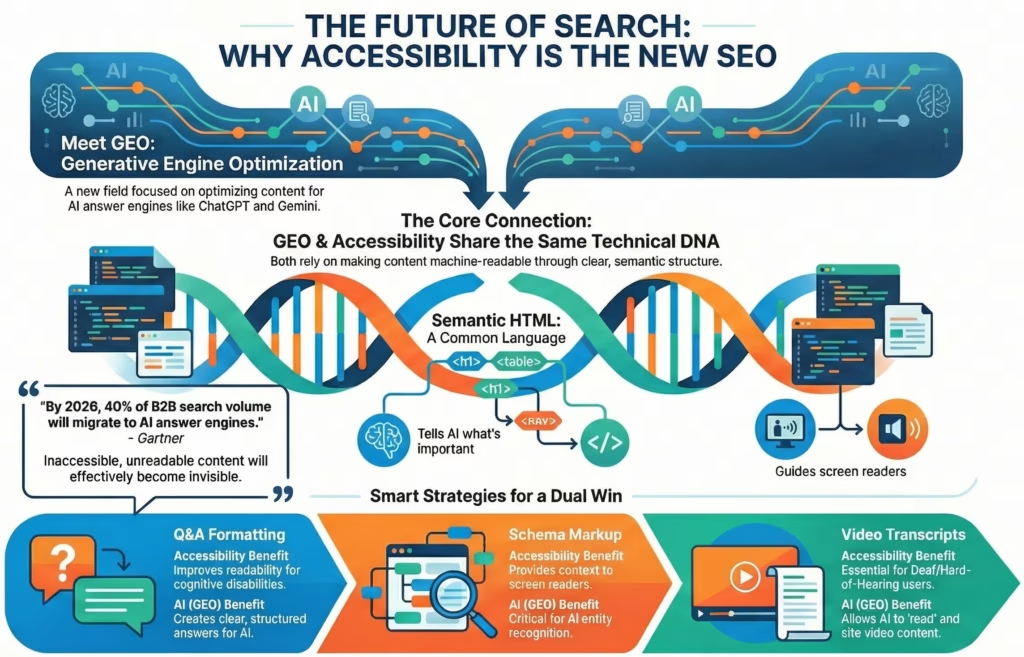
As 2025 reshapes search behavior, a new discipline has emerged: Generative Engine Optimization (GEO). This field focuses on optimizing content for AI-driven “answer engines” like ChatGPT (OpenAI), Gemini (Google), and Copilot (Microsoft/Bing). Crucially, the technical requirements for GEO are nearly identical to the technical requirements for accessibility.
3.1 From Keywords to Semantic Understanding
Traditional SEO relied on keywords and backlinks. GEO relies on “machine readability” and “semantic understanding.” Large Language Models (LLMs) ingest vast amounts of HTML to understand the structure and meaning of content.
- Semantic HTML as a Signal: Accessibility relies on semantic tags (<nav>, <main>, <article>, <aside>, <h1>-<h6>) to convey meaning to screen readers. These same tags provide the structural skeleton that LLMs use to determine the hierarchy and importance of content. An <h1> tag tells both a screen reader and an AI model, “This is the most important topic on the page.”
- Table Data: Accessible tables (using <th>, <caption>, and scope attributes) allow screen readers to navigate complex data. Similarly, LLMs can parse accessible tables accurately to extract statistics for user queries. Inaccessible tables (built with <div>s) are often hallucinated or ignored by AI models.21
3.2 Strategies for Dual Optimization
To succeed in the GEO landscape of 2025, organizations must adopt strategies that serve both human users (via assistive technology) and AI agents.
| GEO Strategy | Accessibility Benefit | Technical Implementation |
| Q&A Formatting | Improves readability for cognitive disabilities; creates “chunked” content for screen readers. | Use <dl> (Definition Lists) or strict Heading/Paragraph structures. Keep answers <300 chars.21 |
| Schema Markup | Provides context to screen readers (e.g., “FAQ Section”); critical for AI entity recognition. | Implement FAQPage and HowTo schema using JSON-LD.21 |
| Video Transcripts | Essential for Deaf/Hard-of-Hearing users. | Allows AI to “read” video content and cite it in answers.22 |
| Plain Language | Aids users with cognitive impairments (Cognitive Accessibility). | “B1” reading level preferred by LLMs for summarization.23 |
Gartner Prediction: By 2026, 40% of B2B search volume will migrate from traditional search engines to AI answer engines.21 Content that is not accessible—and therefore not machine-readable—will effectively become invisible in this new ecosystem.
4. Operationalizing Shift Left: A Technical Framework
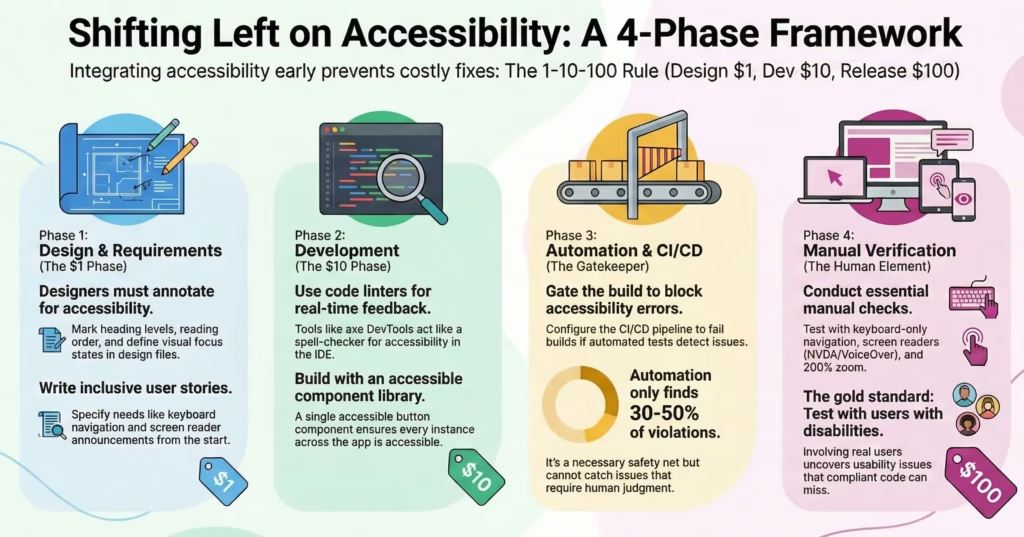
To realize the economic benefits of the 1-10-100 rule and meet the regulatory demands of 2025, organizations must operationalize the “Shift Left” philosophy. This requires a transformation of the CI/CD pipeline and the “Definition of Done” (DoD).
4.1 Phase 1: Design & Requirements (The $1 Phase)
Accessibility must be a constraint, not a feature. It begins before a single line of code is written.
The Role of the Designer:
Designers are the gatekeepers of visual accessibility. In 2025, the standard workflow involves:
- Annotation: Using tools like the “A11y Annotation Kit” in Figma to explicitly mark heading levels, reading order, and interactive elements for developers.24
- Contrast Validation: Plugins like Stark or Contrast are integrated into the design environment to ensure all color combinations meet WCAG 2.1 AA ratios (4.5:1 for normal text).
- State Definition: Designers must define visual states for focus, hover, and active. The “focus ring” is often removed by designers for aesthetic reasons, creating a major barrier for keyboard users. Shift Left requires designing custom focus indicators that align with the brand.24
Inclusive User Stories:
Product Managers must include accessibility in user stories.
- Bad Story: “As a user, I want to filter the search results.”
- Good Story: “As a keyboard user, I want to filter search results without getting trapped in the filter menu, and I want the number of results to be announced when the filter is applied.”
4.2 Phase 2: Development (The $10 Phase)
The goal in development is to provide real-time feedback to engineers, similar to a spell-checker.
Linting and IDE Integration:
- axe DevTools Linter: This tool runs in VS Code and checks code as it is typed. It can flag common errors like missing alt attributes on images, invalid ARIA roles, or duplicate IDs. This prevents the error from ever being committed to the repository.25
- Unit Testing: Developers use libraries like jest-axe to write unit tests for accessibility. For example, a test can assert that a modal component traps focus correctly or that a button has an accessible name.
Component Libraries:
Organizations should invest in accessible design systems. If a “Button” component is built once with full accessibility support, every instance of that button across the application inherits that accessibility. This leverages the “write once, fix everywhere” principle.
4.3 Phase 3: Automation & CI/CD (The Gatekeeper)
Automated testing serves as the safety net for the pipeline.
Pipeline Integration:
Tools like Pa11y CI or the Axe CLI are integrated into the build process (GitHub Actions, Jenkins, CircleCI).
- Gating: The pipeline should be configured to fail the build if accessibility errors are detected. This prevents bad code from being merged into the main branch.27
- Reporting: Reports are generated for every build, providing a historical trend of accessibility health.
Limitations of Automation:
It is crucial to acknowledge that automated tools can only detect 30% to 50% of WCAG violations.6 They can catch syntax errors (missing labels) but not semantic errors (does the label make sense?). Therefore, automation is necessary but not sufficient.
4.4 Phase 4: Manual Verification (The Human Element)
Manual testing captures the nuances of usability that automation misses.
The Testing Protocol:
- Keyboard Testing: Navigate the entire application using only Tab, Space, Enter, and arrows. Ensure focus is always visible and logical.
- Screen Reader Testing: Test critical flows using NVDA (Windows) or VoiceOver (Mac).
- Zoom Testing: Ensure the interface remains usable when zoomed to 200% or 400%.
User Testing:
Involving people with disabilities in the testing process is the gold standard. As seen in the Zomato case study, technically compliant code can still be unusable if the user flow is poorly designed.28
5. Case Studies: The ROI of Inclusion
Real-world examples from the 2024-2025 period illustrate the tangible impact of accessibility on business performance and brand equity.
5.1 Financial Sector: SBI YONO (India)
The Challenge:
The State Bank of India (SBI) launched its comprehensive digital platform, YONO, to serve 450 million customers. However, the app faced severe criticism for its login interface, which used a randomized, custom numeric keypad for MPIN entry to prevent screen scraping. This design was catastrophic for visually impaired users (who could not memorize the layout as it changed) and elderly users (who found the small, shifting buttons difficult to press).29
The Shift Left Intervention:
Recognizing the barrier, the design team initiated a redesign focusing on inclusivity.
- Biometric Integration: They introduced fingerprint and Face ID login, completely bypassing the cognitive and physical load of the keypad.
- Native Keyboards: For manual entry, they reverted to the system-native keyboard, allowing screen readers and switch devices to interact standardly.
- Information Architecture: They flattened the navigation hierarchy based on usage data, making core tasks like “Check Balance” accessible in one tap.
The Outcome:
The redesign reduced the time to complete core banking tasks by approximately 60%. By addressing the needs of the “next billion users”—including the 37% of users over age 40 who adopted mobile banking post-pandemic—SBI significantly reduced customer support friction and improved adoption rates.29
5.2 Service Sector: Zomato (Global Food Delivery)
The Challenge:
In 2020, during the height of the pandemic, visually impaired activist Aziz Minat launched a petition highlighting that Zomato’s app was unusable for blind users. Essential buttons were unlabeled, making them invisible to screen readers like TalkBack. In a time when food delivery was a lifeline, this exclusion was critical.30
The Shift Left Intervention:
Zomato did not treat this as a mere bug fix; they treated it as a product pivot.
- Rapid Remediation: Within a month, the engineering team patched the semantic labels.
- Innovation (Voice UI): Going further, they explored Voice User Interfaces (VUI) to allow users to order food via conversation, bypassing the complex visual UI entirely.32
- Systemic Change: By 2025, Zomato was hosting “Access-Ability Conclaves,” inviting the disability community to test beta features and launching self-identification options for users to customize their accessibility settings.28
The Outcome:
Zomato transformed a potential PR disaster into a competitive advantage, positioning itself as the most inclusive platform in the gig economy and securing loyalty from the disability community.
5.3 E-Commerce: Flipkart (Bridging the Digital Divide)
The Challenge:
To continue its growth, Flipkart needed to penetrate India’s Tier-2 and Tier-3 cities. These markets are characterized by lower digital literacy, older devices, and diverse linguistic needs. Inaccessible, text-heavy interfaces were a barrier to entry.
The Shift Left Intervention:
Flipkart adopted a “Voice-First” and vernacular strategy.
- Voice Search: They integrated robust voice search capabilities that understood regional dialects, making the platform accessible to those with limited literacy or motor impairments.
- Visual Simplicity: They streamlined the interface to be high-contrast and data-light, aiding users with visual impairments and those on slow networks.
The Outcome:
This inclusive approach allowed Flipkart to maintain dominance against global competitors like Amazon. By making the platform accessible to the “next 100 million” users, they demonstrated that accessibility is synonymous with market expansion.33
6. The Future Outlook: 2026 and Beyond
As organizations scramble to meet the 2025 deadlines, the horizon of accessibility continues to expand.
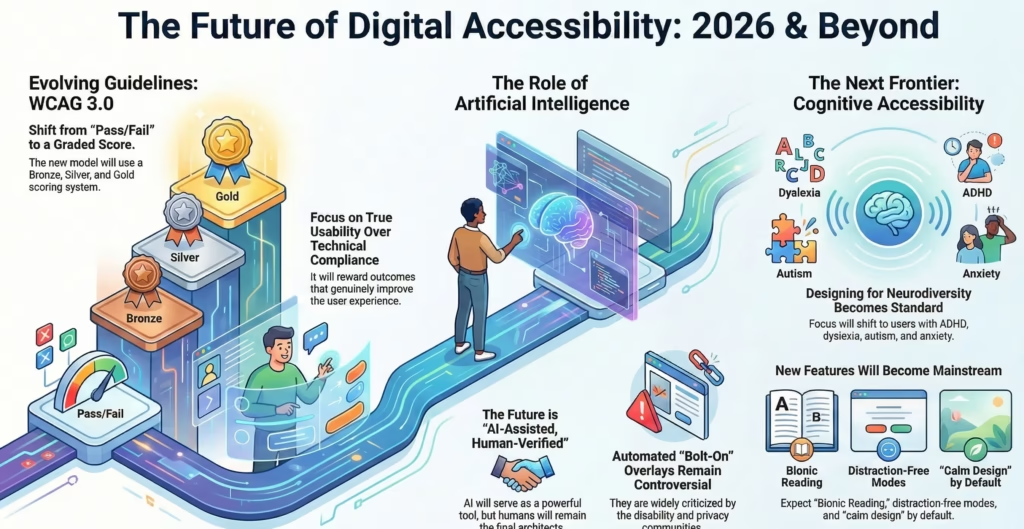
6.1 WCAG 3.0 (Projected)
The World Wide Web Consortium (W3C) is developing the next generation of guidelines, WCAG 3.0 (codenamed “Silver”). Unlike the binary “Pass/Fail” model of WCAG 2.x, WCAG 3.0 introduces a scoring system (Bronze, Silver, Gold). This outcome-based model will allow for more nuance, rewarding organizations that go beyond technical compliance to achieve true usability.35
6.2 AI-Driven Remediation and Risk
The use of AI to “fix” accessibility (e.g., automated overlays) remains controversial. While AI can help generate alt text or suggest code fixes (GitHub Copilot), reliance on “bolt-on” overlays has been widely criticized by the disability community and privacy advocates. The consensus for the future is “AI-Assisted, Human-Verified.” AI will be the linting tool, but the human will remain the architect.
6.3 Neurodiversity and Cognitive Accessibility
The next frontier is cognitive accessibility. Designing for users with ADHD, dyslexia, autism, and anxiety will become standard. Features like “Bionic Reading” (highlighting parts of words), distraction-free modes, and “calm design” principles will move from niche settings to default interfaces.
Conclusion
The “Shift Left” methodology is no longer merely an engineering optimization; it is the linchpin of a modern, resilient digital strategy. The convergence of the 1-10-100 cost rule, the punitive global regulatory environment of 2025, and the immense economic potential of the $18 trillion disability market creates a business case that is impossible to ignore.
By integrating accessibility into the DNA of the design and development process, organizations can reduce remediation costs by orders of magnitude, mitigate existential legal risks, and unlock vast new revenue streams. Furthermore, in an era where AI defines digital visibility, accessibility is the foundation of Generative Engine Optimization.
The path forward is clear: Integrate early, automate wisely, and design inclusively. The cost of inaction—measured in legal fees, lost market share, and technical debt—is a price that no sustainable enterprise can afford to pay.
Frequently Asked Questions (FAQ)
Economics & ROI
Q1: What is the “1-10-100 Rule” in the context of accessibility?
A: The 1-10-100 Rule is a quality management concept which states that preventing a defect in the design phase costs $1, correcting it during development costs $10, and fixing it after release costs $100. In accessibility, this multiplier can be even higher (up to 100x or 1000x) due to the complexity of retrofitting semantic code and the high costs of litigation and customer support associated with live defects.1
Q2: How does accessibility impact customer support costs?
A: Accessible interfaces are generally more intuitive and easier to navigate for all users, not just those with disabilities. This clarity reduces user error and confusion, leading to a projected 25-40% reduction in customer support tickets and interaction costs.7
Q3: What is the “Click-Away Pound”?
A: This term refers to the revenue lost when customers with disabilities abandon a website due to accessibility barriers. Studies show that 86% of users with disabilities will leave an inaccessible site to purchase from a competitor, representing a significant loss of the “Purple Dollar” (disposable income of the disability community).7
Regulations & Compliance
Q4: Does the European Accessibility Act (EAA) apply to non-European companies?
A: Yes. The EAA applies to any economic operator (manufacturer, importer, distributor) that places products or services on the EU market. If a US or Indian company sells digital services to consumers in the EU, they must comply with the EAA by June 28, 2025, or face penalties and potential market exclusion.9
Q5: What are the new SEBI accessibility requirements for Indian financial entities?
A: SEBI has mandated that all Regulated Entities (REs) must appoint IAAP-certified auditors and conduct comprehensive accessibility audits of their investor-facing platforms. The deadline for submitting the “Digital Accessibility Readiness & Compliance Status Report” is March 31, 2026. The mandate enforces WCAG 2.1 Level AA and IS 17802 standards.16
Q6: What is the deadline for ADA Title II compliance in the US?
A: State and local governments with populations of 50,000 or more must ensure their web and mobile content complies with WCAG 2.1 Level AA by April 24, 2026. Smaller entities (population under 50,000) have until April 24, 2027.20
Technical & GEO
Q7: How does accessibility improve Generative Engine Optimization (GEO)?
A: AI models (LLMs) rely on structured data to understand content. Accessibility requires semantic HTML (headings, tables, lists) which provides this structure. Additionally, accessible content often uses plain language and schema markup, which are key factors in how AI engines select content to generate answers. Therefore, accessible sites are more likely to be cited by AI tools like ChatGPT and Gemini.21
Q8: Can automated testing tools replace manual audits?
A: No. Automated tools (like Lighthouse or axe) can only detect approximately 30-50% of accessibility violations. They excel at finding syntax errors (e.g., missing labels, low contrast) but cannot assess semantic meaning or usability (e.g., “Does this alt text accurately describe the image?”). Manual testing with screen readers and keyboard navigation is essential for full compliance.6
Q9: What are the best tools for “Shifting Left” in the design phase?
A: For designers using Figma, plugins like Stark, Contrast, and A11y Annotation Kit are industry standards. They allow designers to check color contrast, simulate color blindness, and annotate accessibility requirements (like reading order) before the design is handed off to developers.24
Q10: What is the difference between WCAG 2.2 and WCAG 3.0?
A: WCAG 2.2 (the current official recommendation) follows a binary “Pass/Fail” model based on specific success criteria. WCAG 3.0 (currently in development, codenamed “Silver”) proposes a more holistic, outcome-based scoring model (Bronze, Silver, Gold) that accounts for usability and testing with people with disabilities, rather than just technical checklists.35
References /Works cited
- The 1-10-100 rule: The real impact of poor data – Loqate blog | GB, accessed on December 29, 2025
- IBM System Science Institute Relative Cost of Fixing Defects – ResearchGate, accessed on December 29, 2025
- Automated Regression Testing | The True Cost of Software Bugs in 2025 | CloudQA, accessed on December 29, 2025
- Doing the numbers: Digital accessibility and shifting left – Deque, accessed on December 29, 2025
- The business case for accessibility – Deque Systems, accessed on December 29, 2025
- The Cost of Accessibility Tech Debt – DEV Community, accessed on December 29, 2025
- Return on Investment in Inclusive Design: How Digital Accessibility Ensures Up to 400% ROI?, accessed on December 29, 2025
- Beyond Compliance: The Economic Case for Digital Accessibility – NASCIO, accessed on December 29, 2025
- European Accessibility Act 2025: Get ready for the June deadline – Siteimprove, accessed on December 29, 2025
- June 28th, 2025 is the deadline for digital accessibility – DEPT, accessed on December 29, 2025
- U.S. Businesses Must Prepare for EU Accessibility Act Compliance by June 28, accessed on December 29, 2025
- June 28, 2025: which businesses must comply with the Accessibility Act? – Hinto®Group, accessed on December 29, 2025
- SEBI Circular (July 31, 2025): Mandatory Digital Accessibility for Financial Sector Entities, accessed on December 29, 2025
- India: SEBI Mandates Digital Accessibility for all Regulated Entities – L&E Global, accessed on December 29, 2025
- SEBI Issues Clarification on Digital Accessibility Requirements: Guide for Regulated Entities, accessed on December 29, 2025
- SEBI Clarifies Digital Accessibility Compliance Requirements for 2026, accessed on December 29, 2025
- Final Rule on Web Accessibility | Civil Rights and Title IX Compliance | Western Washington University, accessed on December 29, 2025
- Justice Department’s Final Rule to Improve Web and Mobile App Access for People with Disabilities, accessed on December 29, 2025
- The Real ROI of ADA Compliance: Beyond Avoiding Lawsuits | ThinkPod Agency, accessed on December 29, 2025
- ADA Title II: What Public Entities Need to Know in 2026 – 3Play Media, accessed on December 29, 2025
- Generative Engine Optimization (GEO): Best Practices for Fortune …, accessed on December 29, 2025
- How to Get Your Website Ready for AI Search in 2026, accessed on December 29, 2025
- How to write so AI search engines can find your content, accessed on December 29, 2025
- Best Figma Plugins to Design for Accessibility – BrowserStack, accessed on December 29, 2025
- Web Accessibility Evaluation Tools List – W3C, accessed on December 29, 2025
- Three quick ways to shift left and fix accessibility issues sooner …, accessed on December 29, 2025
- Effective Methods and Tools for Incorporating Accessibility Conformance Validation within Development Processes | Section508.gov, accessed on December 29, 2025
- Zomato and Blinkit Host Accessibility Testing Conclave to Advance Inclusive Digital Platforms – The CSR Universe, accessed on December 29, 2025
- UX Case Study: Redesigning the SBI Yono Banking App, to make …, accessed on December 29, 2025
- How Food Delivery Apps are Becoming More Accessible for Visually …, accessed on December 29, 2025
- Visually impaired people are signing petitions addressed to food delivery apps. Here is why, accessed on December 29, 2025
- Zomatalk — VUI concept for ordering food online | by Vaidehi Vartak – Medium, accessed on December 29, 2025
- 2024-2025 Case Studies | PDF | Marketing | E Commerce – Scribd, accessed on December 29, 2025
- The Product Case Study of Flipkart – Product Monk, accessed on December 29, 2025
- WCAG 3 Introduction | Web Accessibility Initiative (WAI) – W3C, accessed on December 29, 2025
- New WCAG 3.0 in September 2025: What Changed, How It Differs from WCAG 2.x, and What To Do Next | by Nick Chukreiev | Medium, accessed on December 29, 2025
- SEBI sets a new standard for digital accessibility in finance in India—Here’s what to know, accessed on December 29, 2025
- How to Optimize Content for AI Search Engines [2026 Guide] – Semrush, accessed on December 29, 2025
- 27 Best Web Accessibility Testing Tools in 2025 – The CTO Club, accessed on December 29, 2025