
If you run a business in Walnut Creek, Concord, Pleasant Hill, Oakland, Pleasanton, or elsewhere in Contra Costa or Alameda County, you may have wondered whether your website needs a cookie banner.
You have probably seen websites display messages asking visitors to accept or manage cookies. But does your own business website need one? And what does California privacy law actually require?
The short answer is that not every California business website is legally required to display a cookie banner. Whether your business has obligations under the California Consumer Privacy Act (CCPA), as amended by the California Privacy Rights Act (CPRA), depends on factors such as your business, the personal information you collect, and how you use or share that information.
Cookies and tracking technologies can play a role in these requirements, particularly when they collect information for analytics or advertising. Understanding what your website collects and how that information is used is a practical first step.
Let’s look at what California privacy law requires and what business owners across the East Bay and Bay Area should review on their websites.
1. Does California Law Require Every Website to Have a Cookie Banner?
No. California’s CCPA/CPRA does not require every website to display a cookie banner simply because it uses cookies.
The law applies to certain for-profit businesses that do business in California, determine the purposes and means of processing consumers’ personal information, and meet at least one of the applicable business thresholds.
The applicable thresholds include a business that:
- Had annual gross revenue of $26.625 million or more in the preceding calendar year (2025 figure).
- Buys, sells, or shares the personal information of 100,000 or more California consumers or households annually.
- Derives 50% or more of its annual revenue from selling or sharing consumers’ personal information.
These thresholds are subject to periodic adjustment. The California Privacy Protection Agency publishes the applicable figures and updates. You can review the California Privacy Protection Agency’s threshold information.
If your business is covered by the CCPA/CPRA, you may have obligations relating to privacy notices, consumer rights, and opt-out choices. However, that does not automatically mean you must display a traditional cookie consent banner.
The important distinction is that California law focuses on how personal information is collected, used, sold, or shared—not simply whether a website uses cookies.
2. When Do Cookies and Tracking Tools Become a Privacy Concern?
Cookies are small files or pieces of data stored in a visitor’s browser. Websites use them for different purposes, and not all cookies have the same privacy implications.
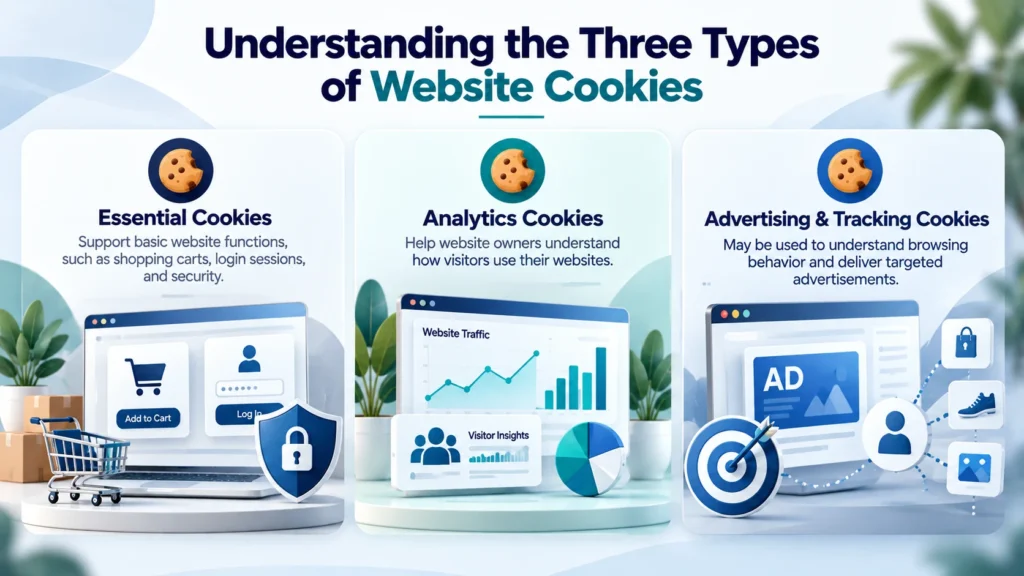
Here are three common categories:
Essential cookies: Support basic website functions, such as maintaining a shopping cart, remembering a login session, or keeping a website secure.
Analytics cookies: Help website owners understand visitor activity, such as which pages people visit and how they interact with the website.
Advertising and tracking cookies: May be used to understand browsing behavior, measure advertising performance, or deliver targeted advertisements.
The use of analytics or advertising cookies does not automatically mean that a business is selling or sharing personal information under California law. The actual information collected, the parties receiving it, and how it is used all matter.
Consider a few local examples:
- A Walnut Creek dental office running Google Ads may use tracking tools to measure advertising performance and understand how visitors interact with its website.
- A Concord HVAC company using a Facebook pixel may send certain visitor activity to an advertising platform.
- A Pleasanton e-commerce shop may use analytics and advertising tools to understand shopping behavior and measure conversions.
These examples do not automatically establish that a business is selling or sharing personal information under the CCPA. The actual data practices and applicable legal requirements need to be reviewed.
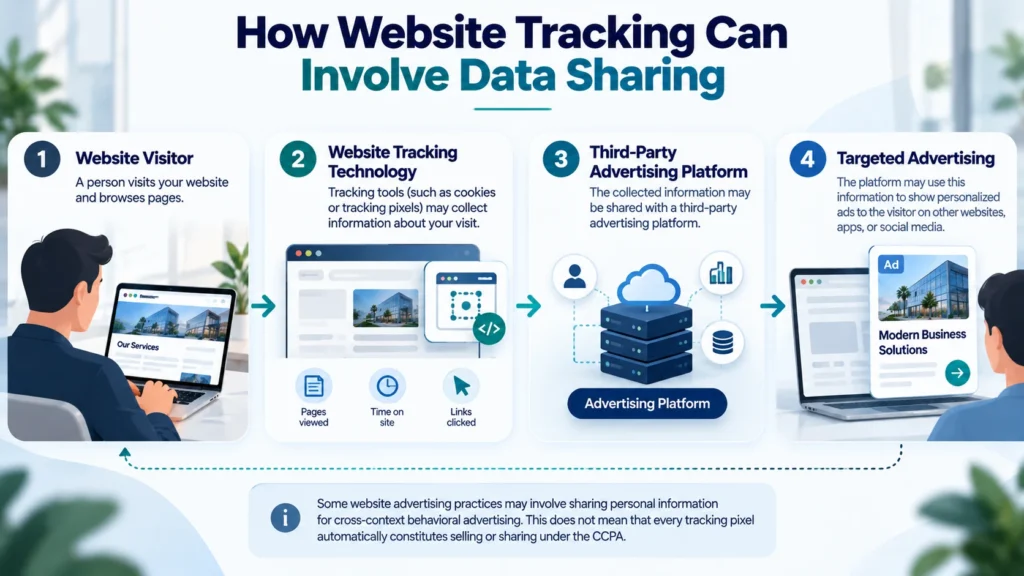
For example, if a website uses an advertising pixel or another tracking technology to send information about visitor activity to a third-party advertising platform, the activity may fall within the CCPA’s definition of sharing if the information is used for cross-context behavioral advertising.
This is why businesses should review the tracking technologies installed on their websites rather than relying only on the name or category of a cookie.
3. When Do You Need a “Do Not Sell or Share My Personal Information” Link?
The CCPA gives California consumers the right to opt out of the sale or sharing of their personal information, subject to the law’s requirements and exceptions.
For covered businesses that sell or share personal information, this means providing an appropriate way for consumers to exercise that right.
A website may need a clearly visible link titled:
Do Not Sell or Share My Personal Information
This link should take visitors to a page or mechanism where they can submit their opt-out request.
It is important to understand that the CCPA’s definition of “sharing” is broader than simply providing information in exchange for money. It can include disclosing personal information to third parties for cross-context behavioral advertising, even when no money changes hands.
For example, consider a business website that uses tracking technology to share visitor activity with an advertising platform. The platform may use that information, together with information from other websites or services, to help deliver targeted advertisements.
If your business is covered by the CCPA/CPRA and engages in activities that qualify as selling or sharing, you should review the applicable opt-out requirements and how visitors can exercise their rights.
For more information, see theCalifornia Attorney General’s CCPA guidance.
4. What Is Global Privacy Control (GPC)?
Global Privacy Control (GPC) is a browser-based privacy signal that allows users to communicate their preference to opt out of the sale or sharing of their personal information.
Some browsers and browser extensions support GPC. When a user enables it, the browser sends a signal to websites that can recognize it.
Under California law, businesses covered by the CCPA/CPRA must treat a valid GPC signal as an opt-out request, subject to the applicable requirements.
This is important because a website cannot rely only on visitors clicking an opt-out link. It must also account for qualifying browser-based opt-out signals.

For website owners, this means checking whether their website and relevant tracking technologies are configured to recognize and respect GPC signals where required.
You can learn more from theCalifornia Attorney General’s Global Privacy Control guidance.
5. Is California’s Cookie Policy the Same as Europe’s GDPR Requirements?
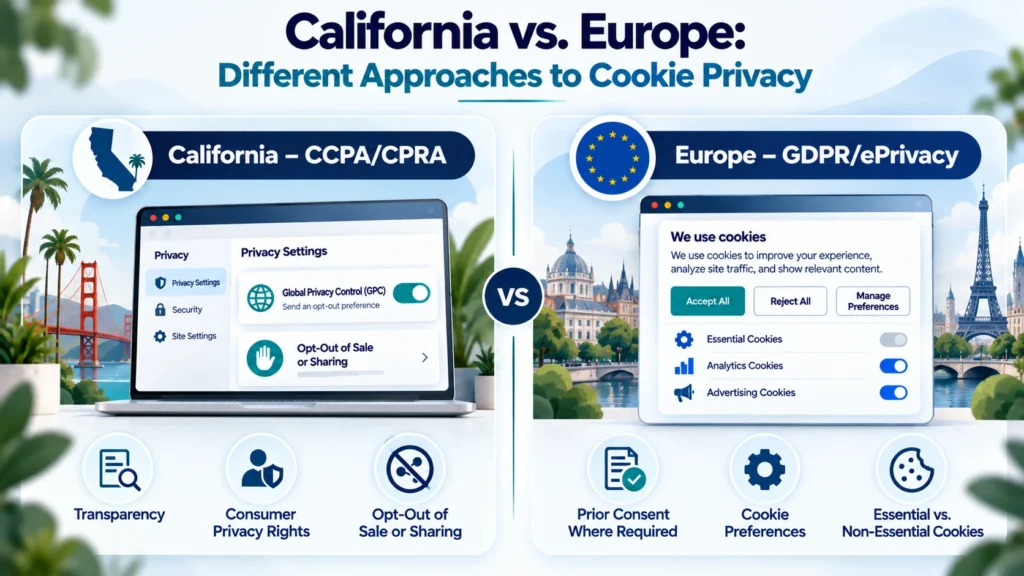
No. California’s CCPA/CPRA and Europe’s General Data Protection Regulation (GDPR), along with applicable ePrivacy rules, take different approaches to cookies and online tracking.
Under the European framework, websites generally need prior consent for non-essential cookies and similar tracking technologies where the applicable rules require it. Essential cookies are treated differently.
California’s CCPA/CPRA does not impose a universal requirement to obtain prior consent for every non-essential cookie. Instead, it focuses on transparency, consumer privacy rights, and opt-out requirements for certain activities, including the sale or sharing of personal information.
This distinction matters for businesses that serve visitors in both California and Europe. A cookie banner or consent-management setup designed for one jurisdiction may not automatically address the requirements of another.
If your website serves customers in multiple regions, your privacy notices and consent-management approach should reflect the laws that apply to those visitors.
For general information, see theEuropean Commission’s cookies policy.
6. A Practical Cookie and Privacy Check for Your Website
If you are unsure whether your website’s cookie and tracking setup needs attention, start with a practical review.
Here are some areas to check:
1. Identify the cookies and tracking technologies on your website.
Review the cookies, pixels, analytics tools, advertising scripts, and third-party integrations currently installed. Make sure you understand what each one does and what information it collects.
2. Review your privacy policy.
Your privacy policy should accurately explain the personal information your business collects, how it is used, and whether it is disclosed, sold, or shared. It should also explain applicable consumer privacy rights.
Make sure your privacy notice is readable for all your visitors, including those who speak Spanish, Chinese, or other languages common in the Bay Area.
3. Check your notice at collection.
Where required, visitors should receive information about the categories of personal information collected and the purposes for which that information is used at or before collection.
4. Review opt-out options.
If your business is covered by the CCPA/CPRA and sells or shares personal information, check that the required opt-out method is available and easy to find.
5. Test Global Privacy Control.
Check whether your website and relevant systems recognize and appropriately process valid GPC signals where required.
6. Consider where your website visitors are located.
If your website serves visitors in California, other US states, or Europe, review which privacy requirements may apply to those visitors.
7. Review third-party services and integrations.
Tools such as Google Analytics, advertising platforms, embedded content, and marketing integrations may collect or receive information through your website. Review their settings and how they interact with your privacy choices.
For businesses using Google services, it is also worth understanding Google Consent Mode. Consent Mode communicates consent choices to supported Google tags and services. However, it does not itself collect consent or provide a cookie banner.
A cookie banner, consent-management platform, privacy policy, and tracking configuration serve different purposes. They should work together where applicable.
Website accessibility is a separate consideration from cookie and privacy management. If you are reviewing your website more broadly, you can also readIs There a WCAG Certificate? andThe Overlay Trap.
7. Frequently Asked Questions
Q1. Does every California website need a cookie banner?
No. The CCPA/CPRA does not require every California website to display a cookie banner. Whether a business has privacy obligations depends on whether it is covered by the law and how it collects, uses, sells, or shares personal information.
Q2. Does using Google Analytics mean my website needs a cookie banner?
Not automatically. The use of Google Analytics does not, by itself, determine whether your business needs a cookie banner. You should review what information is collected, how the service is configured, and which privacy requirements apply to your business and visitors.
Q3. What is the difference between selling and sharing personal information under the CCPA?
Selling generally involves exchanging personal information for monetary or other valuable consideration. Sharing has a specific meaning under the CCPA and includes disclosing personal information for cross-context behavioral advertising, whether or not money changes hands.
Q4. What is Global Privacy Control, and does my website need to recognize it?
Global Privacy Control is a browser-based signal that communicates a user’s preference to opt out of the sale or sharing of personal information. Businesses covered by the CCPA/CPRA must treat a valid GPC signal as an opt-out request, subject to applicable requirements.
Q5. Does a cookie banner make my website CCPA-compliant?
No. A cookie banner alone does not establish compliance. Businesses may also need appropriate privacy notices, opt-out methods, processes for handling consumer requests, and systems that respect applicable privacy signals.
Q6. What is the current CCPA revenue threshold?
The annual gross revenue threshold is $26.625 million or more in the preceding calendar year (2025 figure). The law also includes separate thresholds based on the number of consumers or households whose personal information is bought, sold, or shared, and the percentage of revenue derived from selling or sharing personal information. Check the California Privacy Protection Agency for updated figures.
Q7. Is the CCPA the same as GDPR?
No. The CCPA/CPRA and GDPR have different requirements. For example, European rules generally require prior consent for non-essential cookies where applicable, while California’s framework does not impose a universal prior-consent requirement for every non-essential cookie.
Q8. Can a small business be subject to the CCPA/CPRA?
Yes, depending on its activities and whether it meets one of the law’s applicable thresholds. Annual revenue is only one of the criteria; the consumer-data and revenue-from-selling-or-sharing thresholds should also be considered.
Q9. Can Kha Creation check my website’s cookies if I’m in the East Bay?
Yes. Kha Creation is based in Contra Costa County and helps businesses across the East Bay, the wider Bay Area, and California. We can review website cookies, tracking tools, and related technical configurations and discuss areas that may need attention.
8. How Kha Creation Helps Bay Area Businesses With Website Privacy and Cookie Management
Understanding what your website collects and how its tracking tools work can be challenging, particularly when multiple plugins, analytics services, advertising tools, and third-party integrations are involved.
Kha Creation helps businesses review and manage the website components involved in their online operations. Based in Contra Costa County, we work with businesses across the East Bay and the wider Bay Area.
Depending on your website and its requirements, our support can include:
- Reviewing website cookies, tracking scripts, and third-party integrations.
- Identifying analytics and advertising technologies installed on the website.
- Helping configure consent-management tools, such as Cookiebot, where appropriate.
- Reviewing the placement and functionality of privacy notices and opt-out links.
- Helping configure website tools to support applicable privacy preferences and signals.
- Providing ongoing website maintenance and technical support.
You can learn more about our Website Development services, Maintenance & Support, and Website ADA Compliance services.
For further reading, you may also find ourUnruh Act Survival Guide useful when reviewing broader website considerations for California businesses.
9. Conclusion: Make Sure Your Website’s Privacy Practices Are Clear
A cookie banner alone does not determine whether your website meets applicable privacy requirements. What matters is understanding the information your website collects, how tracking technologies use it, and whether visitors have the privacy choices required by the laws that apply to your business.
For East Bay and Bay Area businesses, reviewing cookies, third-party integrations, privacy notices, and opt-out mechanisms is a practical starting point.
Not sure what your website is tracking?Kha Creation can review your site’s cookies and tracking tools. We work with businesses across the East Bay and the Bay Area.
Disclaimer: This article is intended for general informational purposes only and does not constitute legal advice. Privacy requirements depend on the circumstances of each business and its data practices. This article is not a legal assessment or determination of compliance. Consult a qualified privacy attorney for advice about your business’s obligations under applicable privacy laws.