
“Has my website been updated for PHP2Shell?”
That is the question every business with a website should be asking this week. On October 21, 2026, the PHP project released fixes for two critical security flaws, nicknamed PHP2Shell (CVE-2026-109618 and CVE-2026-109619). Security researchers have already seen attackers trying to exploit them, and that activity is expected to grow as criminals search for websites that have not been updated.
PHP is the software that runs behind the scenes on a large share of the web, including WordPress, WooCommerce, Magento, and many custom business sites. If your website uses any of these, this affects you.
This article explains what PHP2Shell is, what it means for you, and what to do next, whether you own a website or build websites for clients.
1. What Is PHP2Shell?
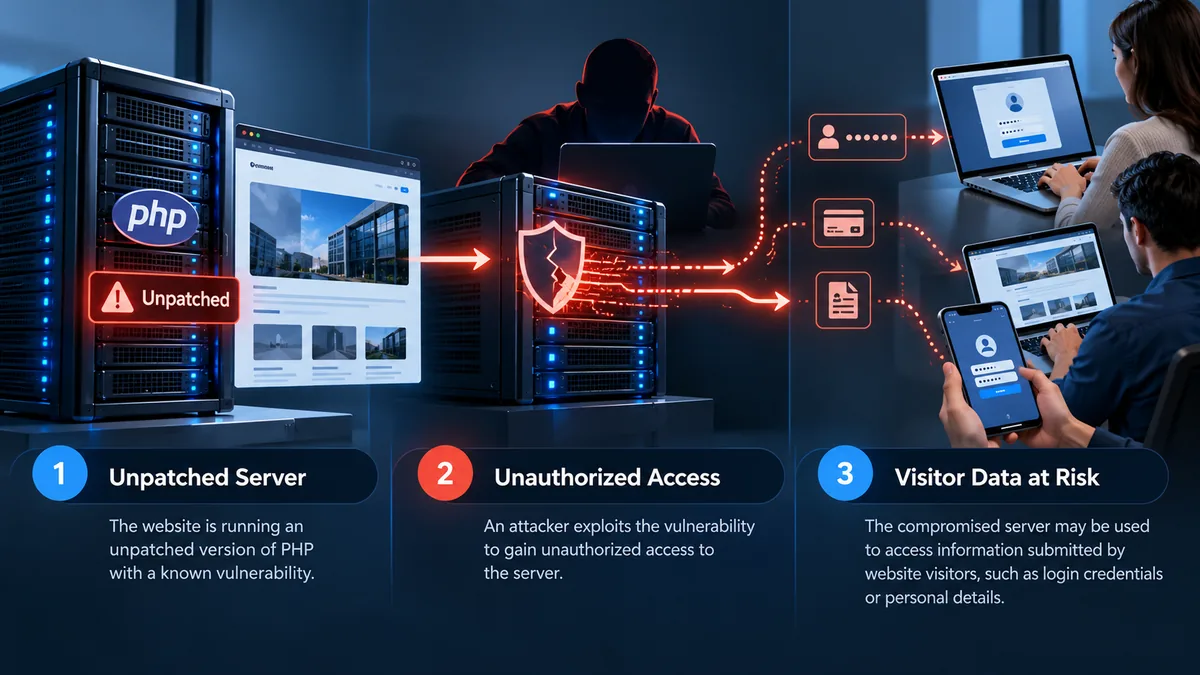
PHP2Shell is the informal name for two vulnerabilities in PHP itself. Both are rated critical, with a CVSS v4.0 score of 9.2. In plain terms, they can allow an attacker to run their own code on a web server without logging in.
Once an attacker controls a server, they can:
- Steal information: capture passwords, form submissions, and customer data.
- Redirect visitors: send people to look-alike pages that collect logins or payment details.
- Spread malware: use a trusted website to install harmful software on visitors’ devices.
- Damage your reputation: get your site flagged by browsers and search engines as unsafe.
The most important point: a hacked website can look completely normal. Owners often find out only after customers complain or Google displays a warning.
1.1 Why This One Is Urgent
- It is already being exploited. Security firms have reported attack attempts in the wild, and Amazon’s threat intelligence team recorded one even before the fix was public.
- The fix is not automatic. Your site is protected only after the PHP version on your server has actually been updated and restarted.
- No setting fully fixes it. According to the PHP project, configuration changes are only partial measures. Updating PHP is the only complete fix.
- Older PHP versions are a bigger risk. Fixed releases are available for PHP 8.2, 8.3, 8.4, and 8.5. Older versions (7.4, 8.0, and 8.1) are no longer officially supported, and only source-code patches were published for them. Researchers estimate that hundreds of thousands of public servers still run these older versions.
For technical details, see Help Net Security’s PHP2Shell report and Datadog Security Labs’ analysis.
2. If You Own a Website
You do not need to understand PHP to protect your business. You need to ask the right person the right question.
2.1 Ask for Confirmation in Writing
Contact your web developer, agency, or hosting company today and ask them to confirm, in writing, that:
- Your server’s PHP has been updated to a version that includes the PHP2Shell fixes (CVE-2026-109618 and CVE-2026-109619).
- PHP was restarted after the update, so the fixed version is actually running.
- Your site was checked afterward for signs that it had already been compromised.
If they are not sure what you are asking about, treat that as a warning sign and get a second opinion.
2.2 Do Not Wait for Something to Look Wrong
Because a compromised site can look normal, “it seems fine” is not confirmation. Ask for the check even if your site is working.
2.3 Use This as a Health Check
PHP2Shell is a good reminder to look at the bigger picture. Sites running outdated PHP versions, old themes, or plugins that have not been updated in years are the most likely to break or be compromised when a new flaw appears. A security update is a good time to clean those up as well, and if a site has outgrown its original build, a website redesign may be the better long-term fix.
For more on keeping a site healthy, read Kha Creation’s articles on a critical WordPress security plugin vulnerability and malware outbreaks targeting WordPress websites.
3. If You Are a Designer or Developer
Many talented web designers and freelance developers build beautiful sites but do not manage servers day to day. When a server-level flaw like PHP2Shell appears, clients still expect their designer to have the answer.
If you have clients asking about PHP2Shell and you need help with the server side, you are not alone, and you do not have to handle it by yourself.
3.1 What Patching Actually Involves
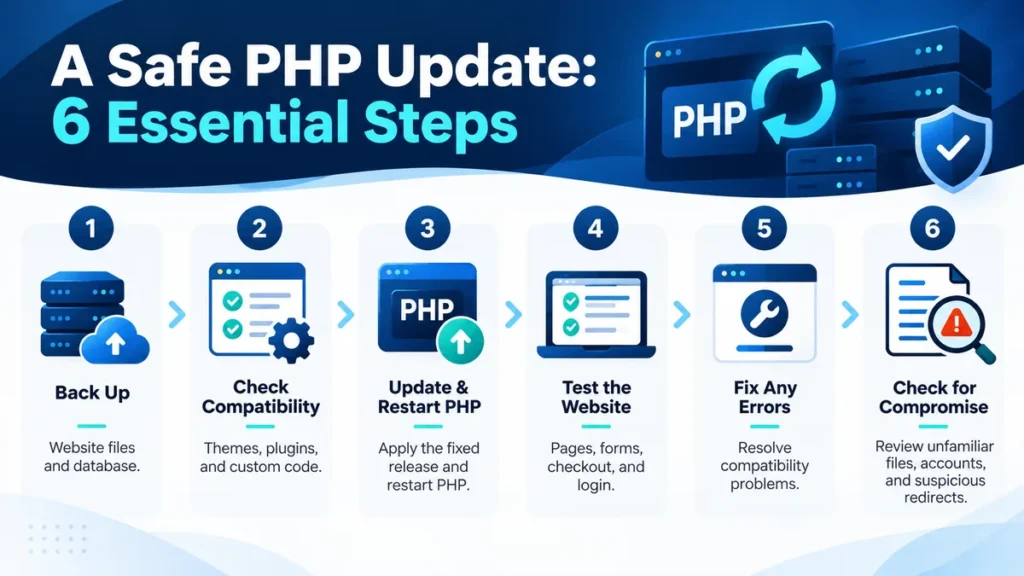
Updating PHP safely is more than clicking “update.” A careful process includes:
- Backup: taking a full backup of files and the database before any change.
- Compatibility check: confirming that the theme, plugins, and custom code will work on the updated PHP version.
- Update and restart: applying the fixed PHP release, or the hosting provider’s patched package, and restarting PHP so the fix takes effect.
- Testing: checking key pages, forms, checkout, and logins after the update.
- Fixing what breaks: resolving errors from outdated plugins or code. Old plugins are often what turn a routine update into a “critical error” on the site.
- Compromise check: looking for unfamiliar files, users, or redirects that suggest the site was attacked before it was patched.
3.2 Partner With a Behind-the-Scenes Team
Kha Creation works with designers, developers, and agencies as a white-label technical partner. We can handle the PHP update, testing, and cleanup for your clients’ sites while you stay the point of contact, so your client relationship stays yours.
Learn more about working with a white-label team in our articles on finding a white-label web developer and choosing a white-label team for your agency.
4. How Kha Creation Can Help
For websites we build, host, or maintain, our team has been checking and updating the servers we manage and reaching out to clients directly to confirm.
If your website is managed by someone else, or you are not sure who manages it, we can help:
- PHP2Shell check: confirm which PHP version your site is running and whether it includes the fixes.
- Safe update: back up your site, update PHP, and test that everything still works.
- Cleanup: fix errors caused by outdated plugins, themes, or custom code.
- Security review: look for signs that the site was compromised before it was patched.
- Ongoing care: keep PHP, WordPress, plugins, and themes up to date so the next security alert is not an emergency.
5. Frequently Asked Questions About PHP2Shell
Q1. How do I know if my website uses PHP?
A. If your site is built on WordPress, WooCommerce, Magento, Drupal, or Joomla, it uses PHP. Many custom-built business sites do too. Your web developer or hosting company can confirm this for you.
Q2. Does PHP2Shell affect my computer or phone?
A. No. The flaw is on web servers, not on personal devices. The risk to you as a visitor is that a legitimate website could be taken over and used to steal passwords or send you to a fake page. Be cautious with unexpected login prompts this week, and open important sites from your bookmarks rather than from links in emails or texts.
Q3. My host says they handle updates. Am I covered?
A. Possibly, but ask them to confirm it specifically for PHP2Shell. Some hosting plans update the server automatically, while others leave PHP versions to the site owner or developer. Sites on older PHP versions may need extra work before they can move to a fixed version.
Q4. Can a security plugin protect my site from PHP2Shell?
A. Not on its own. PHP2Shell is a flaw in PHP itself, beneath WordPress and its plugins. A firewall or security plugin may block some attack attempts, but the PHP project states that updating PHP is the only complete fix.
Q5. I am a designer. Can Kha Creation patch my clients’ sites without contacting them directly?
A. Yes. As a white-label partner, we work behind the scenes and report to you, and you remain the point of contact for your clients.
6. Conclusion: Confirm, Don’t Assume
PHP2Shell is serious, it is being exploited, and it is fixed only when the PHP on your server has been updated. The most important step this week is simple: ask whoever manages your website to confirm in writing that it has been patched.
If you build websites for others, make sure each client site you are responsible for has been updated and checked, and bring in help if you need it.
7. Need Help With PHP2Shell?
Whether you own a website or manage sites for your clients, Kha Creation can check your PHP version, apply the update safely, and make sure everything still works afterward.
Not sure whether your site is protected? Contact Kha Creation to talk through your website or your clients’ sites.
This article provides general information about a developing security issue. Details may change as more information becomes available.