
“Can you send us your WCAG certificate?”
A client, procurement team, or business partner may ask this question when they need evidence that a website is accessible. But what exactly counts as proof? Is there an official certificate? Will an audit report be enough? What if someone asks for a VPAT or an accessibility statement?
The W3C does not issue official WCAG certification for websites. Independent organizations may offer their own certificates or assessment documents, but these should be evaluated according to what was tested and what the document actually claims.
If someone has requested accessibility documentation from your business, understanding the available options is the first step.
1. Understanding Website Accessibility Documentation
Different documents serve different purposes. The right one depends on what was evaluated, what the requesting organization needs, and which standards or contractual requirements apply.
1.1 Accessibility Audit Report
An accessibility audit evaluates a website against a defined standard, such as the Web Content Accessibility Guidelines (WCAG), at a specified conformance level.
A thorough evaluation combines automated testing with manual review. Depending on the website and the scope of the audit, this may include checking:
- Keyboard navigation: Can users navigate the website and operate interactive elements without a mouse?
- Screen-reader support: Is the content structure meaningful, and are controls identified appropriately?
- Images and text alternatives: Do images have appropriate text alternatives when needed?
- Color contrast and readability: Can users distinguish text and important interface elements?
- Forms and error messages: Are fields labelled, and can users understand and correct errors?
- Multimedia: Are captions and other relevant alternatives provided?
A useful audit report documents the issues identified, where they occur, their impact, and recommended fixes. It should also identify the pages and functionality evaluated, the testing methods used, and any limitations in scope.
A Website Accessibility Review: What to Look For
If your business is arranging an accessibility evaluation, it helps to understand what the review will cover. Depending on the website and the agreed scope, useful questions include:
- Scope: Which pages, templates, forms, and interactive features will be evaluated?
- Testing approach: Will the evaluation combine automated tools with manual testing?
- Findings: Will the report identify the location and nature of each issue, along with its potential impact?
- Recommended fixes: Will the findings include practical recommendations for addressing the identified barriers?
- Follow-up testing: Can the corrected issues be re-tested, with the results documented?
- Limitations: Will the report clearly identify any pages, features, or criteria that were not evaluated?
The exact scope will vary from one website to another. Clarifying these details in advance helps you understand what the resulting report can demonstrate and what may still require attention.
Automated tools can help identify many issues, but they cannot determine conformance on their own. Manual evaluation is also necessary. See the W3C guidance on selecting accessibility evaluation tools.
For a practical starting point, Kha Creation’s WCAG 2.2 compliance checklist offers a related resource.
1.2 Remediation and Re-testing
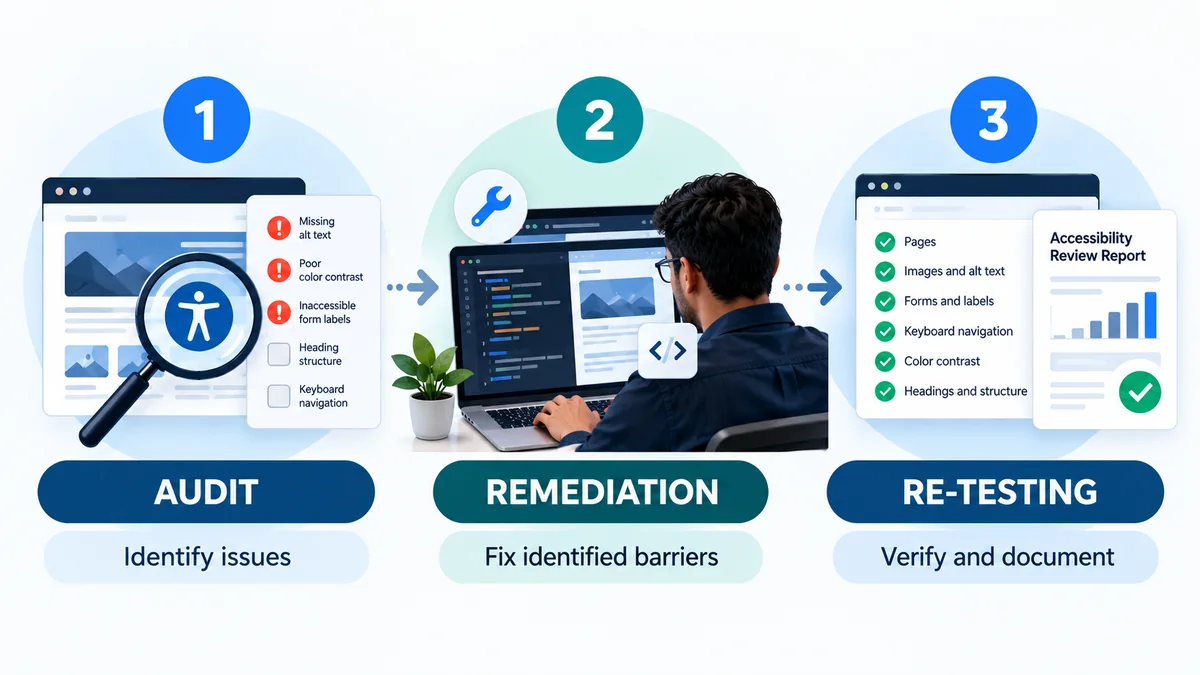
An audit identifies accessibility barriers; it does not fix them.
After the findings have been reviewed, the website’s development team can address the issues and test the affected pages and functionality again.
A clear record should show three things:
- Findings: What issues were identified during the evaluation?
- Remediation: What changes were made to address those issues?
- Re-testing: Which fixes were checked, and what were the results?
Keep the original findings and follow-up results together. This provides a clearer record of what was discovered, what was changed, and what was verified.
The scope of the re-test matters. If only selected issues or pages were checked, the documentation should say so rather than imply that the entire website has been re-evaluated.
1.3 VPAT and Accessibility Conformance Report (ACR)
A VPAT and an ACR are related, but they are not the same thing.
A Voluntary Product Accessibility Template (VPAT) is a template developed by the Information Technology Industry Council (ITI). It helps document how a product or service performs against specified accessibility criteria.
When the template is completed with evaluation results for a particular product or service, the resulting document is called an Accessibility Conformance Report (ACR).
An ACR describes how the evaluated product or service performs against the applicable accessibility criteria. Depending on the template and standard used, findings may include statuses such as “Supports,” “Partially Supports,” “Does Not Support,” or “Not Applicable,” with explanations.
Government buyers, universities, and other organizations may request an ACR when evaluating information and communication technology products and services. Whether one is required depends on the applicable procurement requirements or contract.
A VPAT or ACR is not an automatic certification. ITI provides the template but does not review and approve every completed report.
Important: An ACR is not necessarily the document every business needs when asked for website accessibility proof. Clarify what the requesting organization expects before commissioning or preparing one.
For details, see ITI’s official VPAT guidance and the U.S. Section 508 ACR/VPAT FAQ.
1.4 WCAG Conformance Statement
A WCAG conformance statement is a claim that specified web content conforms to a particular version of WCAG at a stated conformance level.
A meaningful statement should identify its scope and the basis for the claim. The claim should be supported by an appropriate evaluation, not simply by installing an accessibility widget or receiving a high automated scan score.
A statement should not imply that every page, feature, or third-party component has been evaluated if that is not what the assessment covered.
1.5 Website Accessibility Statement
A website accessibility statement serves a different purpose. It is a public-facing page that explains an organization’s accessibility efforts, the standard it aims to follow, known limitations where appropriate, and how visitors can report accessibility barriers or request assistance.
An accessibility statement can help communicate an organization’s approach to visitors. However, publishing one does not itself establish that a website conforms to WCAG.
Neither a conformance statement nor an accessibility statement should be treated as a universal guarantee of legal compliance.
1.6 Which Accessibility Document Do You Need?
The right accessibility document depends on why the evidence is being requested and what your website or organization needs to demonstrate. The following comparison can help you understand the main options.
| Document | What It Shows | When It May Be Useful |
|---|---|---|
| Accessibility audit report | The findings from an accessibility evaluation, including the scope, testing methods, and issues identified | When you need to understand your website’s accessibility barriers |
| Remediation and re-testing record | The changes made to address identified issues and the results of follow-up testing | When documenting accessibility improvements |
| VPAT / Accessibility Conformance Report (ACR) | How an evaluated product or service performs against specified accessibility criteria | When a customer or procurement team requests an ACR |
| WCAG conformance statement | A claim that specified web content conforms to a particular WCAG version and conformance level | When communicating a supported conformance claim |
| Website accessibility statement | Your organization’s accessibility approach, known limitations, and how visitors can report barriers or request assistance | When communicating accessibility information to website visitors |
These documents serve different purposes and are not interchangeable. Before commissioning an evaluation or preparing documentation, clarify what the requesting organization expects, which accessibility standard applies, and what evidence is needed.
2. What Is Not Sufficient Proof of Accessibility?
Some tools can support accessibility work, but they should not be mistaken for evidence that a website meets every applicable requirement.
2.1 An Accessibility Overlay Widget
An accessibility overlay may offer certain adjustments or identify some issues, but it does not automatically resolve every accessibility barrier in a website’s underlying content and code.
Do not rely on an overlay alone as evidence of WCAG conformance. The website itself still needs appropriate evaluation and remediation.
For a deeper explanation, read Kha Creation’s article on accessibility overlay tools and their limitations.
2.2 A Clean Automated Scan
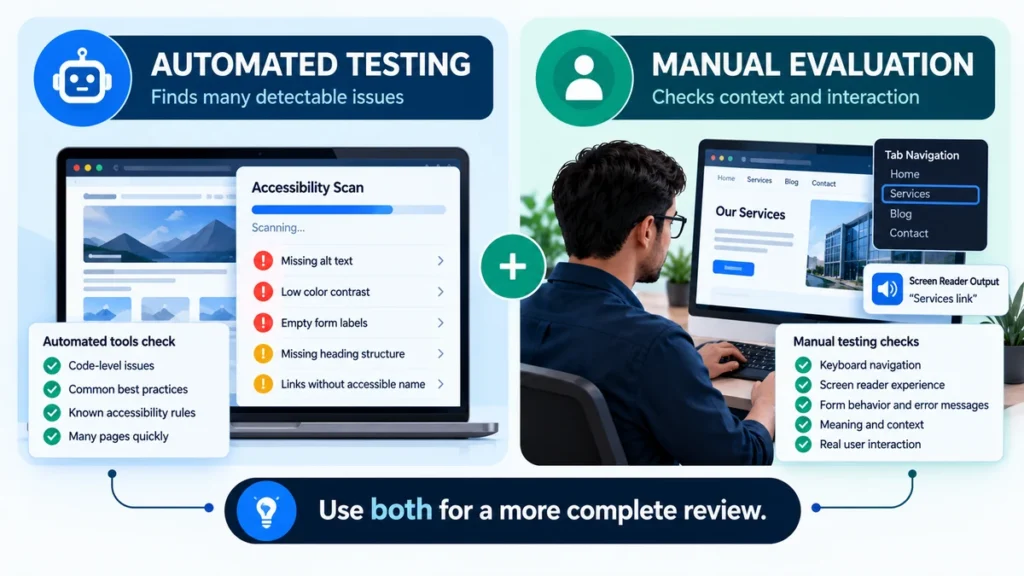
Automated testing tools are useful for identifying certain accessibility issues quickly. However, they cannot evaluate every WCAG success criterion.
Issues involving context, meaningful labels, interaction, and the experience of people using assistive technology may require human judgment and testing.
A clean automated scan is not the same as a complete accessibility evaluation.
3. Keeping Accessibility Documentation Current
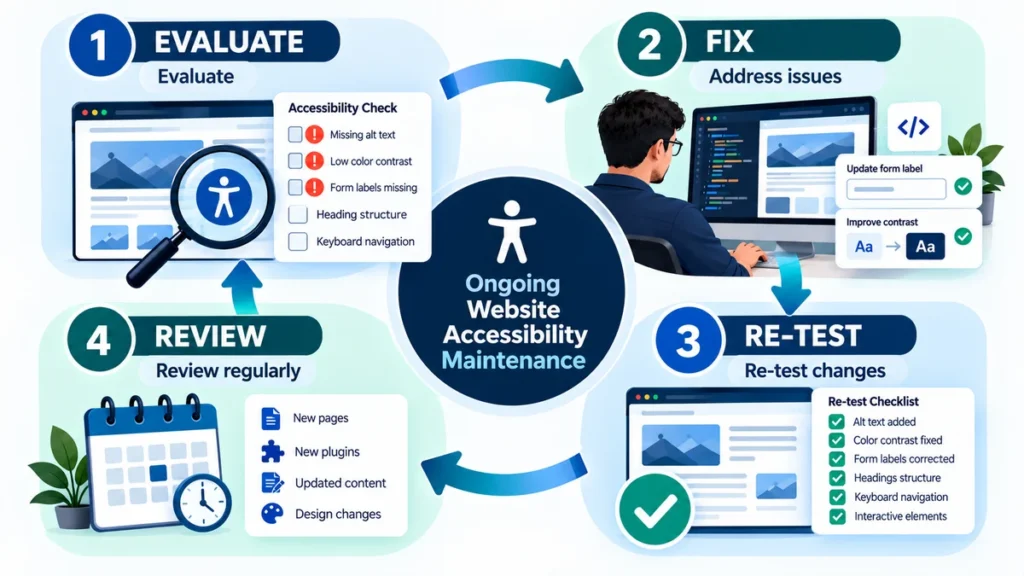
Accessibility is not a one-time task. New pages, uploaded documents, theme changes, plugins, and redesigned forms can introduce barriers that were not present during an earlier evaluation.
To keep your documentation useful, record:
- The date of the evaluation.
- The pages and functionality covered.
- The standards and testing methods used.
- The issues identified and the fixes completed.
- The results and scope of any re-testing.
- Any known limitations or areas that were not evaluated.
Review accessibility again after significant website changes and establish a review schedule appropriate to the site.
This helps prevent an old report from being mistaken for an assessment of the website as it exists today.
4. Frequently Asked Questions About WCAG Certificates
Q1. Is there an official WCAG certificate?
A. The W3C does not issue official WCAG certification for websites. Independent organizations may provide their own certificates, reports, or conformance statements following an evaluation. Check who issued the document, what was tested, and what its claims mean.
Q2. Is a VPAT required by law?
A. There is no universal requirement for every private business to prepare a VPAT. An organization may need an ACR to meet a specific procurement requirement, contract, or customer request. Check the requirements that apply to your situation.
Q3. Which version of WCAG should a website be evaluated against?
A. WCAG 2.2 is the newer version of the WCAG 2 series. W3C encourages using the latest version, and WCAG 2.2 is backward compatible with WCAG 2.1. However, the version relevant to a particular project may depend on the applicable law, policy, or contract.
See the W3C WCAG standards overview.
Q4. How long is an accessibility audit report or conformance statement valid?
A. There is no universal expiration period for every accessibility report or statement. A document describes the evaluation and scope at the time it was conducted. Website changes can introduce new barriers, so the date, scope, and testing limitations should be clear, and the site should be reviewed again as appropriate.
5. Conclusion: What Accessibility Documentation Really Proves
When someone asks for a WCAG certificate, the most useful next step is to clarify what they need to verify. An accessibility audit report, an Accessibility Conformance Report (ACR), a conformance statement, and an accessibility statement each serve different purposes.
No single document automatically proves that every part of a website is accessible in every situation. The value of the documentation depends on what was evaluated, which accessibility criteria were used, what issues were identified, and whether the findings reflect the website as it exists today.
Treat accessibility documentation as part of an ongoing process: evaluate the website, address identified barriers, retest important changes, and keep the documentation current.
6. Need Help Understanding Your Website’s Accessibility?
If a client, procurement team, or business partner has asked you for WCAG documentation, start by clarifying exactly what they need and what evidence your website currently has.
Kha Creation helps businesses review website accessibility, identify potential barriers, and address issues through website improvements and remediation. Depending on your needs, we can discuss an accessibility evaluation, recommended fixes, and follow-up testing.
Learn more about our Website ADA Compliance services to understand how we can help improve your website’s accessibility.
Not sure where your website stands? Contact Kha Creation to discuss your website’s accessibility needs and the documentation you may require.