
Learn how to transform morning inbox fatigue into strategic focus with a structured, 15-minute AI execution model. Originating from Sandeepa Nayak’s presentation at the USPAACC West Educational Business Luncheon (sponsored by PG&E), this guide breaks down simple, secure AI workflows from automated inbox triage to priority time-blocking designed to help business leaders protect deep-work hours and streamline daily operations.
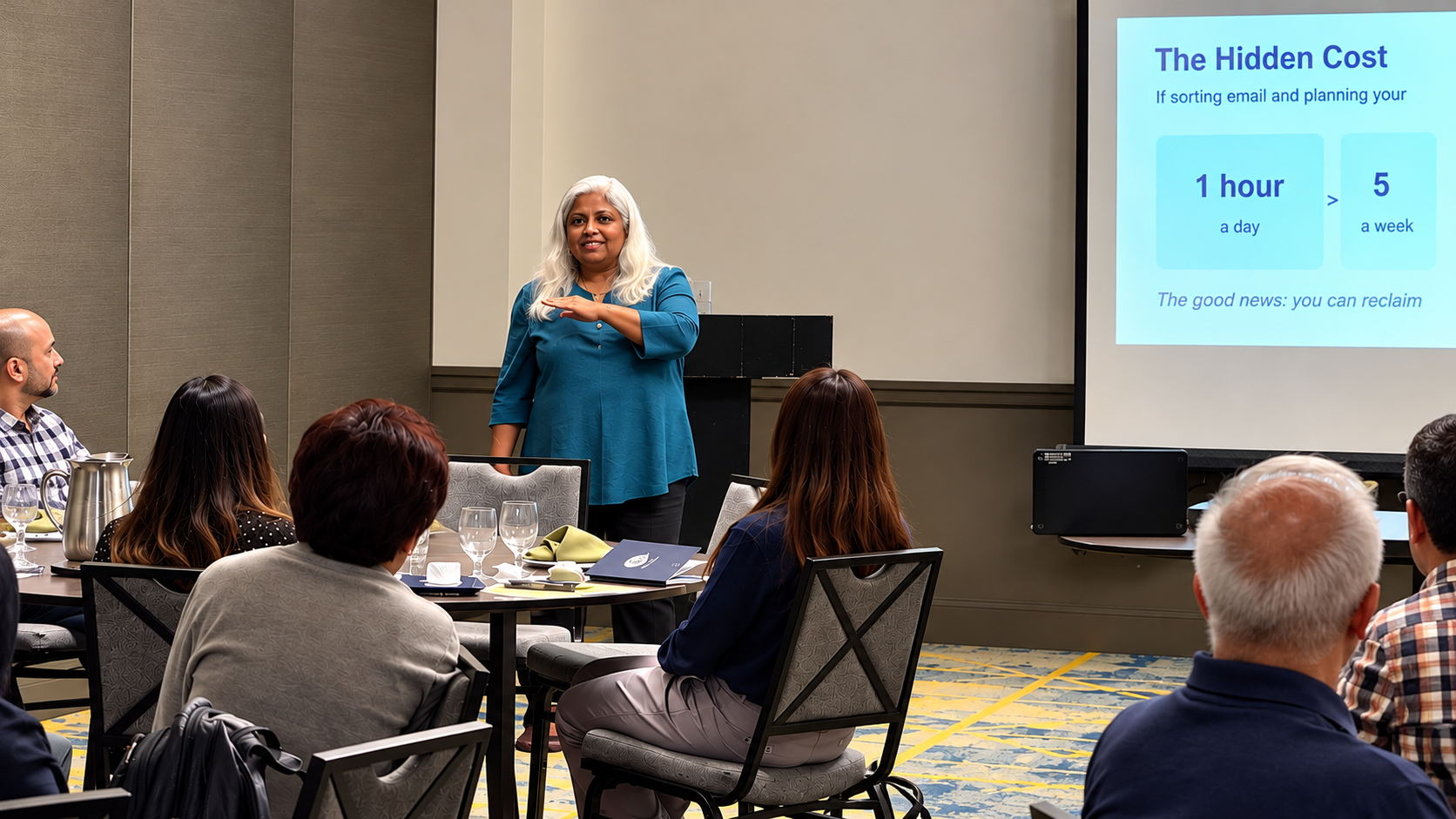
“AI isn’t about replacing the human touch in business; it’s about removing the administrative friction so you can focus entirely on growth and client relationships“.
1. Introduction: The Hidden Cost of a Messy Morning
If you run a small business, think about how you spend your first hour every single day. Are you buried under dozens of unread emails, trying to figure out which client needs a reply, sorting through calendar conflicts, and wondering who you forgot to call?
If administrative tasks eat up just one hour every morning, you are losing over 250 hours a year, which is equivalent to six full weeks of full-time work spent on tasks that generate zero revenue.
2. About the Event: Preparing Small Businesses for the AI Era
To address this exact challenge, Sandeepa Nayak shared a practical, no-coding-required blueprint at the Educational Business Luncheon 2026: Preparing Small Businesses for the AI Era, hosted by the USPAACC Western Region (USPAACC West), sponsored by Pacific Gas and Electric Company (PG&E), and held on Wednesday, September 23, from 12:00 PM to 2:30 PM at the Delta Hotels Santa Clara Silicon Valley (2151 Laurelwood Rd, Santa Clara, CA 95054). A special thank you to our hosts at USPAACC West and our sponsor PG&E for championing small business growth and digital empowerment!

3. What Is an AI Office Assistant and How Does It Function?
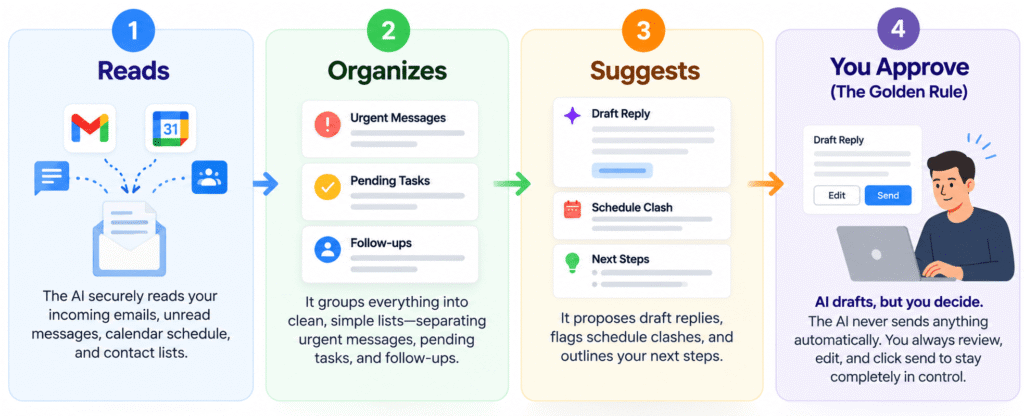
Many people think AI is complicated or requires technical coding skills. In reality, an AI office assistant acts like a smart digital helper that runs in the background of your existing tools (like email and calendars). It operates on a simple, transparent 4-Step Framework:
- Reads: The AI securely reads your incoming emails, unread messages, calendar schedule, and contact lists.
- Organizes: It groups everything into clean, simple lists, separating urgent messages, pending tasks, and follow-ups.
- Suggests: It proposes draft replies, flags schedule clashes, and outlines your next steps.
- You Approve (The Golden Rule): AI drafts, but you decide. The AI never sends anything automatically. You always review, edit, and click send to stay completely in control.
4. My Own 15-Minute Morning Routine
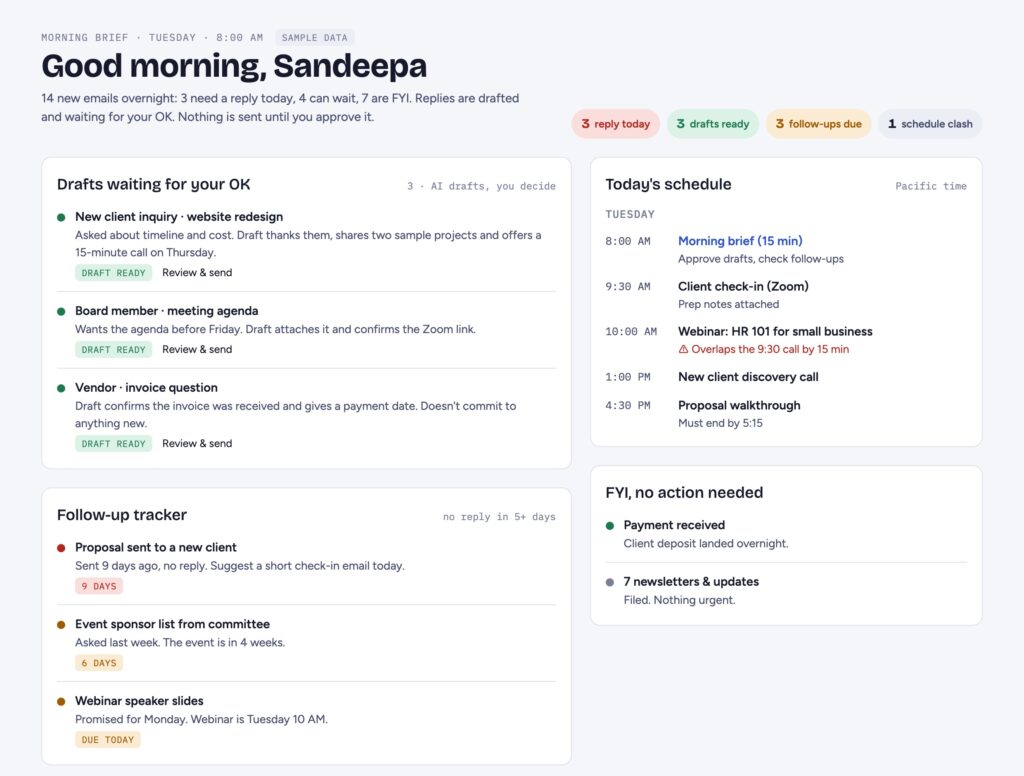
Instead of spending an hour sorting through administrative mess, here is how I use my AI assistant day-to-day to streamline my morning into a smooth 15-minute routine (from 8:00 AM to 8:15 AM):
8:00 AM – Open One Screen: Review the morning brief generated by my assistant summarizing new emails, urgent client requests, and daily meetings in one place.
8:03 AM – Approve Draft Replies: Glance over pre-written email responses, make quick tweaks, and hit send.
8:08 AM – Review the Follow-Up Tracker: Check the prioritized list of client leads who need check-ins based on historical communication intervals.
8:11 AM – Fix Schedule Clashes: Spot overlapping meetings instantly with AI-suggested rescheduling options.
8:15 AM – Start Revenue-Generating Work: Dive straight into core business operations with zero administrative friction.
Get Your Free AI Assistant Prompt Cheat Sheet
Want to skip the trial and error? Enter your name and email below to get instant access to our printable PDF cheat sheet delivered straight to your inbox!
5. Six Administrative Jobs You Can Hand Over to AI
You don’t have to automate your whole business overnight. Start with easy administrative tasks and scale up as your confidence grows:
- Inbox Manager (Easy)
- Response Assistant (Easy)
- Calendar Assistant (Easy)
- Task Manager (Medium)
- Call Planner (Medium)
- Follow-Up Manager (Advanced)
6. Ready-to-Use Prompts You Can Try Tonight
You can test these exact prompts tomorrow morning with tools like ChatGPT, Claude, or Microsoft Copilot:
- For your inbox: “Review my unread email from the last 24 hours. Group it into: needs a reply today, can wait, and FYI only”.
- To draft replies: “Draft a friendly reply to this email. Keep it under 100 words. Don’t commit to any dates”.
- For your calendar: “Look at my calendar for tomorrow. Flag any overlaps or back-to-back meetings with no break”.
- For client follow-ups: “List clients I haven’t emailed in 30 days, with the date of our last message”.
7. Three Ways to Get Started and Their Costs
| Level | What You Do | Time Investment | Approximate Cost |
|---|---|---|---|
| Level 1 | Turn on built-in AI features in Gmail or Outlook (summaries and smart replies). | Minutes | $0 to ~$20 / month |
| Level 2 | Connect an assistant like ChatGPT or Claude to organize your daily schedule. | An afternoon | ~$20 / month |
| Level 3 | Automate workflows across apps using tools like Zapier, Make, or Power Automate. | A weekend | $0 to ~$30 / month |
(Most business owners can get started for under $50 a month.)
8. Is AI Safe for My Business?
To ensure AI automation is secure and valuable for your day-to-day operations, keep these practical guardrails in mind:
- Human-in-the-Loop Control: You maintain 100% control because nothing goes out without your explicit approval.
- Strict Privacy & Guardrails: Start with read-only permissions and protect sensitive client data by reviewing vendor privacy terms.
- High ROI on Time: Trading a minor monthly software subscription to recover 250+ wasted hours a year delivers an immediate return on investment.
- No Coding Required: Because these systems integrate with tools you already use, your team doesn’t need technical expertise to benefit.
Just as AI workflows need regular reviews, your website needs ongoing attention, too. Explore our website maintenance and technical support services to help keep your website updated, secure, and performing reliably.
AI safety also means recognizing suspicious emails and requests. Read our guide to spotting AI scams and verifying suspicious messages before taking action.
9. Frequently Asked Questions (FAQs)
Q1. How can I create an AI office assistant without programming skills?
You can begin with AI features in Gmail or Microsoft Outlook, or use tools such as ChatGPT, Claude, or Microsoft Copilot to summarize emails, draft responses, organize tasks, and review your schedule. For example, you can ask an AI assistant to categorize unread messages by urgency or prepare a list of client follow-ups. These tasks can often be handled without coding. If you need the assistant to retrieve information automatically from multiple systems or perform actions across applications, you may need additional integrations or technical support.
Q2. Which administrative tasks are best suited for AI automation?
Start with repetitive tasks that follow a clear process and require limited independent judgment. Common examples include summarizing incoming emails, drafting routine responses, identifying calendar conflicts, organizing pending tasks, and preparing client follow-up lists. More advanced workflows can use communication history and defined business rules to identify overdue follow-ups. Begin with one task, review the results for accuracy, and expand the workflow once it performs reliably.
Q3. When should a business invest in a custom AI office assistant?
A custom AI assistant may be appropriate when standard AI tools no longer meet your operational requirements. For example, your business may need to connect email, calendars, customer relationship management software, and internal databases; apply specific business rules; or consolidate information into a single operational dashboard. Before investing, identify the limitations of your current tools and define the outcomes you expect. This helps determine whether a no-code integration will suffice or whether a custom application is justified.
Q4. Can an AI office assistant integrate with existing email and calendar systems?
Yes, provided the selected tools support the necessary integrations and permissions. Many workflows can be built around Gmail or Microsoft Outlook and their associated calendar services. Basic setups may use built-in features, while more advanced workflows can involve platforms such as Zapier, Make, or Microsoft Power Automate. Before implementation, verify that the required applications can exchange the necessary information and that the workflow handles errors, duplicate actions, and changes to existing records appropriately.
Q5. What security measures should I consider before connecting AI to business systems?
Review the provider’s privacy terms, data-retention practices, and security controls before connecting business accounts or sharing confidential information. Grant the assistant only the permissions it needs, and begin with read-only access wherever practical. Configure sensitive actions, such as sending emails or changing appointments, to require human approval. Test the workflow with non-sensitive data before using it operationally, and periodically review access permissions and integration settings. Security depends on the complete configuration, not simply on the AI tool being used.
Q6. How can I determine whether AI automation is saving my business time?
Measure the time currently spent on the tasks you intend to automate, including email review, response preparation, scheduling, and follow-ups. After introducing the workflow, compare the time required to complete the same tasks, accounting for review, corrections, and maintenance. For example, if an assistant prepares a morning summary, track how long it takes to review that summary compared with manually reviewing each email and calendar entry. This provides a more reliable estimate of time saved than relying on general automation claims. Use the results to decide whether to refine the workflow or automate additional tasks.
Q7. Where can I get help developing an AI assistant for my specific business needs?
If your requirements extend beyond basic AI features or standard no-code integrations, professional development support can help you assess the workflow, identify suitable technologies, and determine whether a custom solution is necessary. This is particularly useful when multiple systems must work together or the assistant needs to follow business-specific rules and security requirements. KHA Creation can help evaluate these needs and explore a tailored AI application or integration based on your business processes.
10. Conclusion & Next Steps
While setting up basic prompts is a great starting point, many business owners prefer a custom, turnkey solution built precisely for their unique operations. For businesses that need more than basic AI tools, explore our custom web application development services to discover solutions tailored to your workflows.