
AI can now help people create convincing voices, videos, emails, and messages. That creates new opportunities, but it also gives scammers more ways to impersonate someone you know or a business you trust.
At CCBuRN Presents: Senior Tech Safety Day, I shared a simple message: Stop, Check, Verify. I wanted people to understand that a familiar voice, a professional-looking email, or an official-looking logo does not automatically mean a request is genuine.
Afterward, I realized I’d been seeing the same tricks in my clients’ inboxes. Some messages claimed there were problems with a business website or domain, while others used a friendly approach to start a suspicious conversation. These were not just hypothetical examples from a presentation. They were situations business owners were actually encountering.
In each case, the owner paused and asked us first.
That is why I believe the Stop, Check, Verify habit matters to everyone—not just older adults and families, but small-business owners who rely on their websites, domains, and email accounts every day.
Here are the warning signs I want people to recognize and the steps they can take before acting.
1. Why AI Scams Are Harder to Recognize

Imagine receiving a call from a family member who sounds frightened and asks you to send money immediately. Or imagine joining a video call where the person looks exactly like someone you know.
You might also receive an email that appears to come from your bank, a service provider, or your website company. It has the right logo, professional language, and a convincing explanation of why you need to act.
Would you trust it?
AI tools can help criminals create realistic voice imitations, convincing images, and polished messages. Traditional warning signs, such as spelling mistakes and poor formatting, may no longer be present.
The answer is not to fear every call, email, or new technology. It is to develop a simple habit: pause and verify before taking action.
2. Fear, Urgency, and Secrecy: Three Warning Signs
Many scams rely on emotions rather than technology alone. They try to make you worried, rush you into a decision, or stop you from asking anyone for advice.
Watch for these three warning signs:
- Fear: “Something terrible has happened. You need to help me.”
- Urgency: “You must act right now, or your account will be closed.”
- Secrecy: “Please don’t tell anyone. Just do what I’m asking.”
A caller might claim to be a relative in trouble. An email might warn that your account or website will stop working unless you respond immediately.
When fear, urgency, and secrecy appear together, take a step back. Do not send money, share information, click a link, or change your account settings until you have checked the request independently.
3. The Evolution of Phishing: Why Professional Tone Is Not Proof
Historically, security guidelines emphasized identifying spelling mistakes, poor grammar, awkward formatting, and excessive capitalization. Today, AI-assisted tools can generate polished, grammatically accurate emails that look remarkably similar to legitimate business communications.
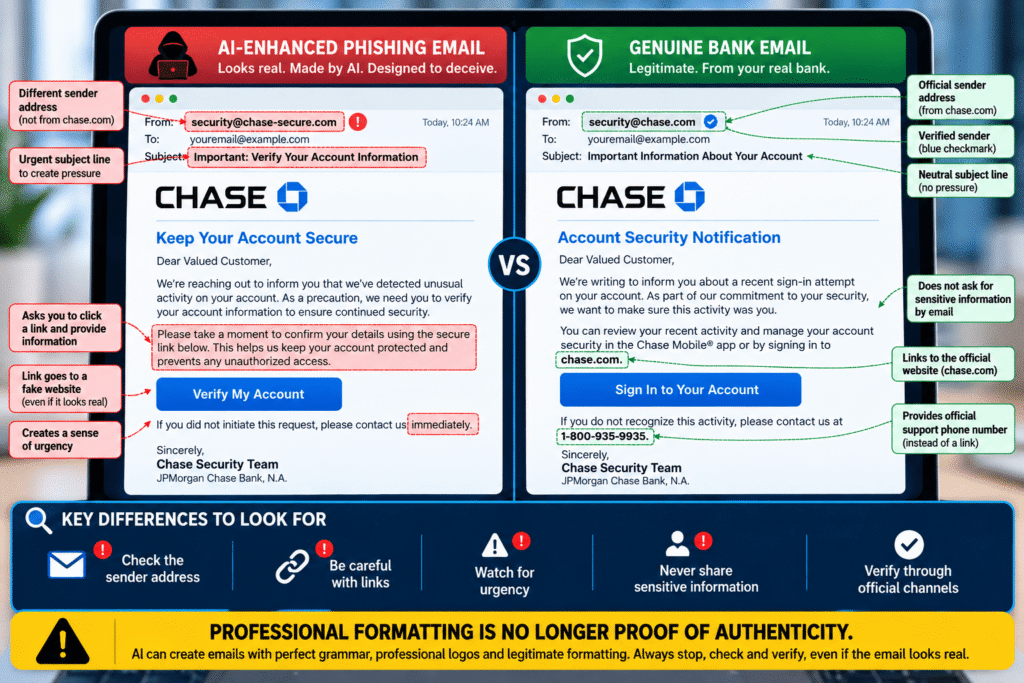
AI-Enhanced Phishing Email
- Sender:
security@chase-secure.com - Subject: “Important: Verify Your Account Information”
- Warning signs: Lookalike domain, request to verify account details through a link, and pressure to act immediately.
Genuine Bank Email – Illustrative Example
- Sender:
security@chase.com - Subject: “Important Information About Your Account”
- Safer approach: Directs users to review activity through the official app or website.
The second message sounds calm, professional, and grammatically correct. However, it could still be a phishing attempt designed to steal login credentials or personal information.
So, what should you look for when an email looks genuine?
- Check the sender’s full email address. Look for misspellings or lookalike domains that imitate a legitimate organization.
- Inspect links carefully. Unexpected links asking you to sign in or verify your account deserve extra caution. Visit the official website directly instead.
- Watch for pressure to act. Even a politely worded message can create urgency or fear to influence your decision.
- Be cautious of sensitive information requests. Never send passwords, PINs, or one-time verification codes by email.
- Verify independently. If a message claims there is a problem with your account, check through the organization’s official app, website, or a trusted phone number.
These clues are not absolute proof of fraud. A genuine email can contain mistakes, and a phishing email can look flawless. Professional formatting is no longer proof of authenticity. When in doubt, Stop, Check, Verify before clicking a link, sharing information, or taking action.
4. Stop, Check, Verify: A Simple Safety Routine
When something unexpected asks you to take action, use these three steps.
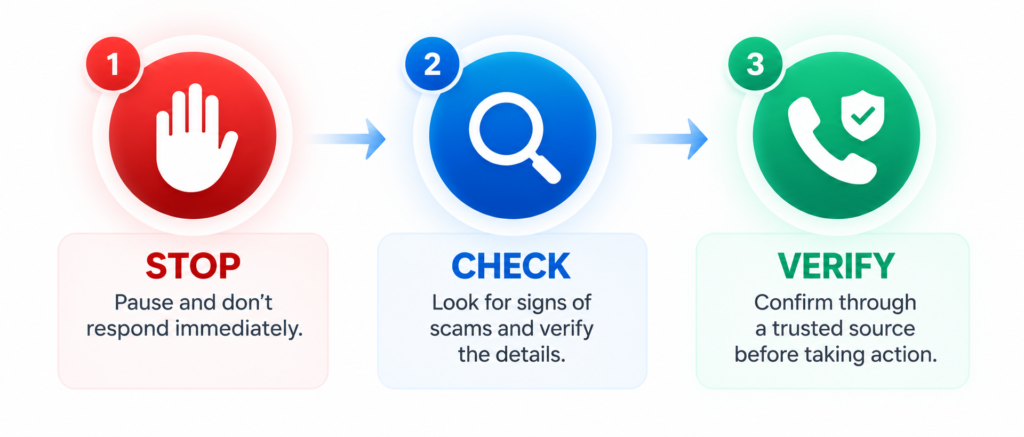
STOP
Do not respond immediately. Take a breath and resist pressure to act quickly. End a suspicious call if necessary, and do not click links or send money just because a message says it is urgent.
CHECK
Look closely at the message and the request. Check the sender’s full email address, the website address, and whether the request is something you expected. Be cautious about unexpected payment requests, password requests, and threats of immediate account suspension.
VERIFY
Use a separate, trusted way to confirm the request. Call the person using a number already saved in your contacts. For a bank, use its official app or the number printed on your card. For a website or domain issue, sign in through your registrar’s known website or contact a provider using details you already trust.
Never rely only on the phone number, link, or contact details included in the suspicious message.
5. Three Website-Related Examples Small Businesses Should Know
Scam awareness is not just for personal phone calls and bank accounts. Small-business owners also receive unexpected messages about their websites, domains, and online presence.
Here are three anonymous examples that show why it is important to check before acting. These examples are shared to explain the warning signs, not to identify or accuse any individual or company.
Example 1: A suspicious domain-transfer message
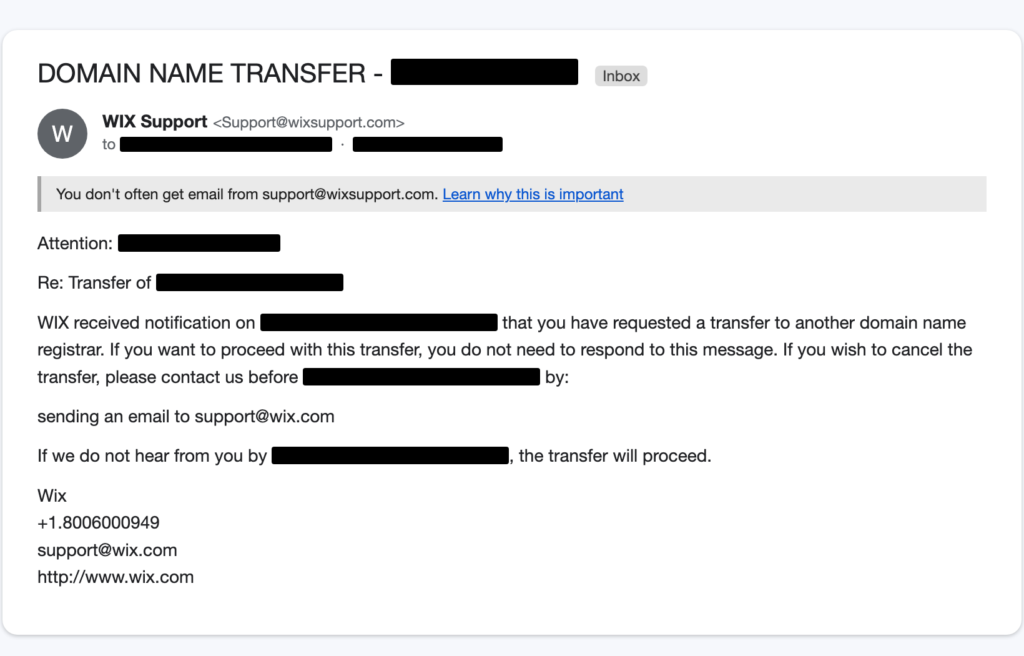
A business owner received an unexpected email claiming that action was needed to transfer the business’s website domain. Although the message claimed to be from Wix, it did not come from Wix. The sender address was support@wixsupport.com, a lookalike address, and the email program flagged the message as suspicious.
This is why checking the sender’s full email address matters. A familiar company name or logo can be copied, but the actual sending address may reveal a warning sign.
Example 2: An unsolicited “warnings on your website” pitch
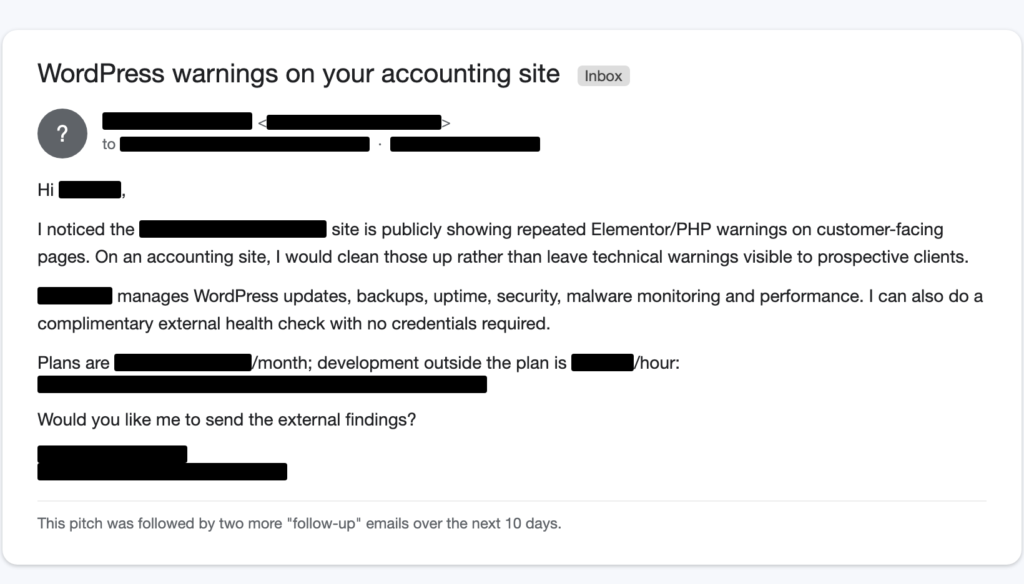
A small business received an unsolicited message claiming there were warnings or problems on its website, followed by a pitch for services. A message like this may create concern that the website is broken, unsafe, or losing customers.
An unsolicited warning is a red flag, but it is not enough on its own to prove that the sender is running a scam.
What to do: Do not make a rushed purchase or provide website access because of an unexpected warning. Ask for specific details about the alleged issue, check the website independently, and consult a provider you already trust if you need help confirming whether a problem exists.
Example 3: A suspicious cryptocurrency lead with a bounced reply
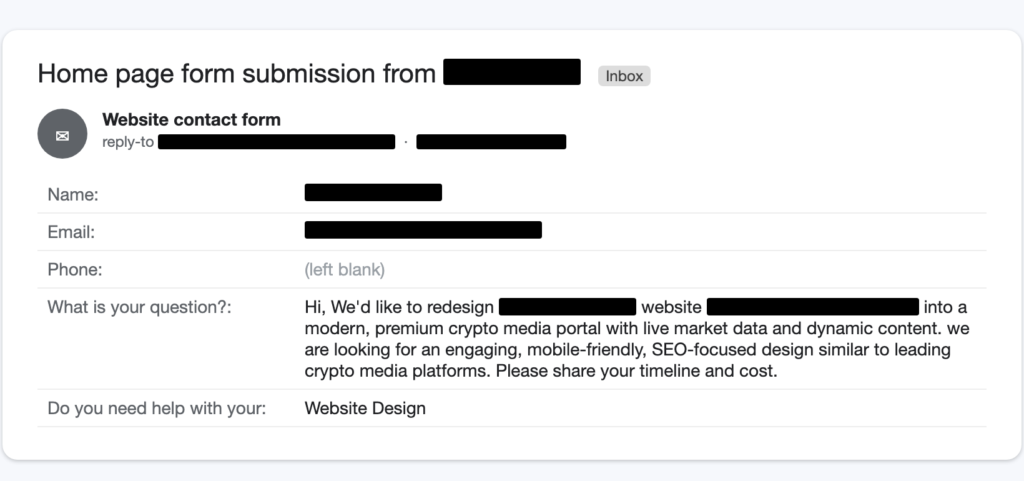
A business received an unexpected contact-form inquiry about a cryptocurrency-related project. Several details raised concerns: the inquiry did not include a phone number, the wording was generic, and the sender moved straight to asking about the “timeline and cost” rather than providing meaningful details about the project. When the business replied, the email bounced instead of reaching the apparent sender.
A bounced email does not automatically prove that a message is fraudulent. However, the combination of missing contact information, a vague inquiry, an immediate focus on price, and an undeliverable reply made this lead worth treating cautiously.
What these examples have in common
Each of these situations began with an unexpected message that could have prompted a business owner to worry, respond quickly, or take action without checking the facts. What mattered was not assuming every unusual message was a scam, but recognizing the warning signs and verifying the details before making a decision.
That is the same Stop, Check, Verify approach I discussed at Senior Tech Safety Day. A few moments of checking can help prevent a rushed decision from becoming a much bigger problem.
6. Never Send Your Logins by Email
Your website, domain, email, and hosting accounts can be essential to your business. If someone gains access to them, the consequences may include lost access, changes to your website, or disruption to your business operations.
Never send your passwords, one-time verification codes, or login credentials by email.
A person who claims to be from your website company, domain registrar, or technical support team should not need you to email your password to them.
If someone needs access to help with your website, use the appropriate account-management or user-permission feature. Give only the access required, and remove it when it is no longer needed.
If you receive an unexpected request for your password or verification code, stop and confirm the request through a trusted contact channel.
7. Your 5-Minute Website Safety Checklist
A few simple checks can help protect your website, domain, and business from avoidable problems. Use this checklist to review your current setup and keep important account information readily available.
Download Your Website Safety Checklist
The downloadable checklist includes space to record your domain details, review key security settings, and save the contact information you may need if a problem arises. You can complete it digitally or print a copy for your business records.
Your checklist covers:
- Domain registrar and renewal date: Confirm which company manages your domain and when it expires.
- Domain ownership: Verify that your domain is registered in your name or your business’s name.
- Automatic renewal: Check your renewal settings and ensure your payment information is up to date.
- Official registrar website: Record the correct website address so you can access your account without relying on links in unexpected emails.
- Two-factor authentication: Confirm that this additional layer of account security is enabled wherever available.
- Trusted support contact: Keep your registrar’s support details and a trusted website support provider’s contact information handy.
Safety reminder: If you receive an unexpected email about your website or domain, verify the request through your registrar’s official website or another trusted contact method before clicking links, sharing information, or making changes.
If your website needs professional attention, explore our website development, technical support, and ongoing maintenance services
8. Everyday Habits That Help Protect You
A few simple habits can make it easier to recognize and handle suspicious requests.
Agree on a family code word
Families can agree on a private word or phrase to use when someone claims there is an emergency. Keep it private, and do not share it in public posts or messages. It is one extra check, not a substitute for independently contacting the person.
Be careful with unusual payment requests
Pause if someone asks for gift cards, cryptocurrency, wire transfers, or payment through an unfamiliar app. These payment methods can be difficult or impossible to reverse.
Ask someone you trust
If a request feels unusual or puts you under pressure, speak with a trusted family member, colleague, or professional before acting. Scammers often try to isolate people from anyone who might question the request.
Contact people using saved details
Caller ID can be spoofed, and email sender names can be misleading. When you need to confirm a request, use a phone number or contact method you already know is genuine.
Report suspicious activity
If you believe a scam has affected you, contact your bank or relevant service provider promptly. In the United States, you can also report suspected fraud to the Federal Trade Commission at ReportFraud.ftc.gov.
9. Using AI Safely and Constructively
AI is not only a source of risk. Used thoughtfully, it can also help people with everyday tasks.
If you’re exploring practical ways to use AI in your business, read our guide to building an AI office assistant without coding
For example, AI tools can help you:
- Summarize a long document or explain an unfamiliar topic in simpler language.
- Draft or edit emails and other correspondence.
- Explore a new subject or practice a language.
- Organize information and create a list of questions to ask a professional.
Avoid sharing passwords, financial account details, confidential business information, or other sensitive personal information with an AI tool unless you have carefully checked the service’s privacy and security arrangements.
For important medical, legal, or financial decisions, use AI as a supporting tool rather than a substitute for qualified professional advice.
The goal is to use technology with confidence while knowing when to pause, check, and ask for help.
10. Key Takeaways
- A familiar voice, recognizable face, professional email, or company logo does not prove that a request is genuine.
- Fear, urgency, and secrecy are warning signs that should prompt you to pause.
- Use Stop, Check, Verify before sending money, clicking unexpected links, changing account settings, or sharing information.
- Verify website and domain warnings by going directly to the registrar or contacting a trusted provider.
- Never send passwords or one-time verification codes by email.
- Review your domain ownership, renewal date, auto-renewal settings, and account security.
- Ask a trusted person or professional for help if you are uncertain.
You do not need to become a technology expert to improve your safety. Building a habit of checking before acting is a practical place to start.
11. About the Event and Speakers
On September 10, 2026, I had the opportunity to speak at CCBuRN Presents: Senior Tech Safety Day, hosted by the BNI CCBuRN Senior Sphere. My session, “Understanding AI: Recognize the Risks and Use It with Confidence in Everyday Life,” focused on helping people understand what modern AI can do, where risks may arise, and how simple habits can help them use technology more safely.
One message I wanted people to take away was simple: you do not need to be a technology expert to protect yourself. When a call, email, or request feels unusual, stop, check the details, and verify through a trusted channel before acting.
Thank you to Randy Nguyen and Chase Young for helping make the event possible. I also appreciated sharing the program with my fellow speakers: Irene Davids-Blair, who spoke about online banking safety, and Clifton Barnes, who covered the physical side of using technology.
My session, Understanding AI: Recognize the Risks and Use It with Confidence in Everyday Life, focused on helping people understand what modern AI can do, where risks may arise, and how practical habits can make technology easier to navigate safely.
12. Frequently Asked Questions
Q1. What is an AI voice-cloning scam?
An AI voice-cloning scam uses artificial intelligence to imitate someone’s voice. Scammers may pretend to be a family member or colleague to request money or sensitive information. Verify unexpected requests through a separate, trusted contact method.
Q2. How can I verify a suspicious video call?
Do not rely on someone’s appearance or voice alone. End the call and contact the person through a phone number or communication method you already trust. If the request is urgent, check with another trusted person before acting.
Q3. Does proper grammar mean a message is legitimate?
No. AI can generate polished, professional-looking messages. Check the sender’s address, website URL, and request independently before clicking links or sharing information.
Q4. What is the Stop, Check, Verify protocol?
It is a simple routine to help you avoid rushed decisions:
- Stop: Pause before reacting to an urgent or alarming message.
- Check: Examine the sender and the details of the request.
- Verify: Confirm the information through a separate, trusted channel before taking action.
Q5. How should I respond to an urgent message claiming to be from my bank?
Do not click unexpected links or call phone numbers provided in the message. Open your bank’s official app or call the number printed on your bank card. Contact your bank directly if you suspect suspicious activity.
Q6. Is AI software safe to use?
AI can be useful for writing, research, and learning, but use it thoughtfully. Avoid sharing sensitive personal or business information unless you understand how the tool handles your data. For important medical, legal, or financial decisions, consult a qualified professional.
13. Need a Second Look at a Website or Domain Message?
Not sure whether an email about your website or domain is legitimate? Forward it to KHA Creation, and we’ll review it for free.
For businesses exploring tailored AI-powered workflows or connected business systems, learn about our custom web application development services
How KHA Creation Can Help
We help businesses maintain and improve their websites. Our website health checks can identify potential issues and highlight areas that may need attention.
Taking a few minutes to verify a message can help protect your website, your business, and your peace of mind.